ACH payouts for manufacturers and wholesalers: complete 2026 guide
Manufacturers and wholesalers’ ACH payout management is the process of sending USD payments through ACH to settle supplier invoices and other business obligations. This 2026 guide explains how to match payment methods to suppliers, protect purchasing schedules, and reconcile payments against purchase orders and invoices.
TL;DR
- An ACH payout for manufacturers and wholesalers fits USD supplier payments when the recipient supports ACH.
- Moneyspace ACH payouts suit verified businesses needing own-name USD details, live status, and controlled team access.
- Moneyspace business payouts have a $100,000 or €100,000 per-payout limit, depending on currency.
- Use invoice references and recipient checks before sending; track completion separately from payment initiation.
Why ACH payouts matter for manufacturers and wholesalers
Choose the payment method around the supplier’s receiving requirements, not your preferred dashboard. A USD invoice doesn’t establish whether the supplier can receive ACH. Confirm the destination and accepted payment method before scheduling the payment.
Manufacturers must connect component payments to purchasing and production requirements. Wholesalers must connect inventory payments to stock replenishment and customer commitments. In both cases, a payment record needs more context than a recipient name and an amount.
For verified businesses, Moneyspace provides dedicated USD and EUR account details in the customer’s own name, plus ACH, wire, and SEPA payouts to supported destinations. It also shows the fee before confirmation and tracks each payout through its stated processing stages.
For your 2026 payment process, separate three questions: Is the invoice approved? Has the payment been sent? Has the payout completed? Treating these as the same event creates an unreliable accounts-payable record.
How to set up ACH payouts for your business
Match each supplier to a supported payment method
Start with a spreadsheet or your existing supplier register. Ask each supplier which currency and payment method they accept, then record the answer beside their legal name and payment details. Don’t infer ACH support from a US customer relationship or a USD invoice.
ACH is a USD payment method associated with the US payment system. SEPA serves euro payments within its participating area. Wire is a separate method; confirm the particular route rather than assuming every wire destination is supported.
For an overseas manufacturer paying a US supplier, confirm both sides of the transaction: your provider must support the payout, and the supplier’s receiving institution must accept it. Your own location alone doesn’t establish whether the route works.
- Record the supplier’s legal recipient name.
- Confirm the invoice currency: USD or EUR.
- Ask whether the recipient accepts ACH, wire, or SEPA.
- Record the receiving details required for that method.
- Confirm destination support before promising a payment date.
Connect invoices to a clear approval record
Use your accounting records and a payment checklist before adding another system. Match the invoice to the purchase order and the relevant goods-receipt or contractual milestone. Investigate mismatches before anyone enters a payout.
For manufacturers, the payment trigger might be an agreed production milestone rather than delivery. For wholesalers, it might be receipt of stock or another contractual term. Your approval record should reflect the actual agreement, not a default assumption that every invoice follows the same sequence.
Separate invoice approval from payment execution. An approved invoice authorizes a business obligation; it doesn’t prove that recipient details are correct or that funds have reached the supplier.
- Attach the invoice to its purchase order.
- Record the delivery or milestone evidence required by your agreement.
- Resolve quantity, currency, and amount discrepancies.
- Name the person responsible for invoice approval.
- Keep the invoice reference with the payout record.
Verify the business and configure access
Prepare your company information and identify who will operate payments before starting provider verification. For a manual workflow, maintain a written access register and keep credentials personal. Shared sign-ins make it harder to establish who performed an action.
Moneyspace uses business verification, or KYB, and one completed verification opens USD and EUR access. Its workspace supports owner, admin, operator, and view-only roles, with several companies and personal profiles under one sign-in. Choose roles deliberately; don’t assume they create a particular approval workflow without checking the permissions.
Every payout, new recipient, and team grant requires 2FA. That adds an authentication step, but it doesn’t replace your invoice checks or independent confirmation of changed supplier details. Approval and country eligibility must be confirmed rather than assumed.
- Prepare the information requested during business verification.
- Assign named users instead of sharing credentials.
- Review owner, admin, operator, and view-only permissions.
- Keep each company’s invoices and payments clearly identified.
- Confirm eligibility before relying on the service for a purchasing commitment.
Schedule payments against supplier deadlines
Work backward from the supplier’s contractual payment date. A calendar and an accounts-payable list are enough to identify when a payment needs attention. Record the due date, intended initiation date, and expected processing window separately.
For 2026 planning, the client’s stated payout timing is usually 1–2 business days. Incoming ACH usually takes 1–3 business days, while incoming wire and SEPA usually arrive within a business day. These are usual timings, not fixed arrival commitments.
If incoming customer payments fund outgoing supplier payments, plan both stages. A customer initiating an ACH payment doesn’t mean those funds are ready for your next payout. Confirm the actual balance and transfer status before committing to a supplier’s deadline.
- Record the contractual due date.
- Plan the intended payout initiation date separately.
- Allow for the stated business-day processing window.
- Check incoming payment status before scheduling dependent payouts.
- Tell suppliers the actual status rather than an assumed arrival date.
Check the recipient, limit, and confirmation screen
Read the payout details against the approved invoice before sending. When a supplier changes payment instructions, confirm the change using a previously established contact channel. Don’t rely only on the message that introduced the new details.
Business payouts have a $100,000 or €100,000 per-payout limit, depending on currency, with no monthly business limit. Individual payouts have a $10,000 or €10,000 per-payout limit and a $50,000 or €50,000 monthly limit. Use the limits for the verified profile handling the payment.
No monthly business limit does not remove the per-payout cap. If an invoice exceeds that cap, resolve the payment arrangement before its due date. Don’t assume the system will accept a larger instruction or arrange installments for you.
- Match the recipient name to approved supplier records.
- Recheck the currency and receiving details.
- Confirm that the payment fits the applicable payout limit.
- Review the fee shown before confirmation.
- Complete the required 2FA step before sending.
Reconcile completion with the supplier ledger
Start with a payment register linked to your accounting records. Track invoice approval, payout initiation, payout status, and reconciliation as separate fields. This keeps an internal approval from being mistaken for a completed transfer.
Moneyspace displays live payout status as Processing, On its way, and Completed. Use those labels when checking a supplier inquiry. Keep any supplier confirmation alongside the invoice record rather than replacing the provider’s status with an unsupported assumption.
For your 2026 reconciliation routine, distinguish payments you’re preparing from those already in progress. Before sending a replacement, check the original payout and investigate its status. A second instruction creates another payment; it doesn’t correct the first one.
- Record the payout against the correct invoice.
- Save the transaction reference with the supplier record.
- Review Processing and On its way items separately.
- Reconcile Completed payouts in your ledger.
- Investigate an unresolved payment before sending another.
The payment record should preserve this sequence: Invoice approval, Recipient check, Payout confirmation, Status review, Ledger reconciliation. Each stage answers a different question, so keep the records distinct.
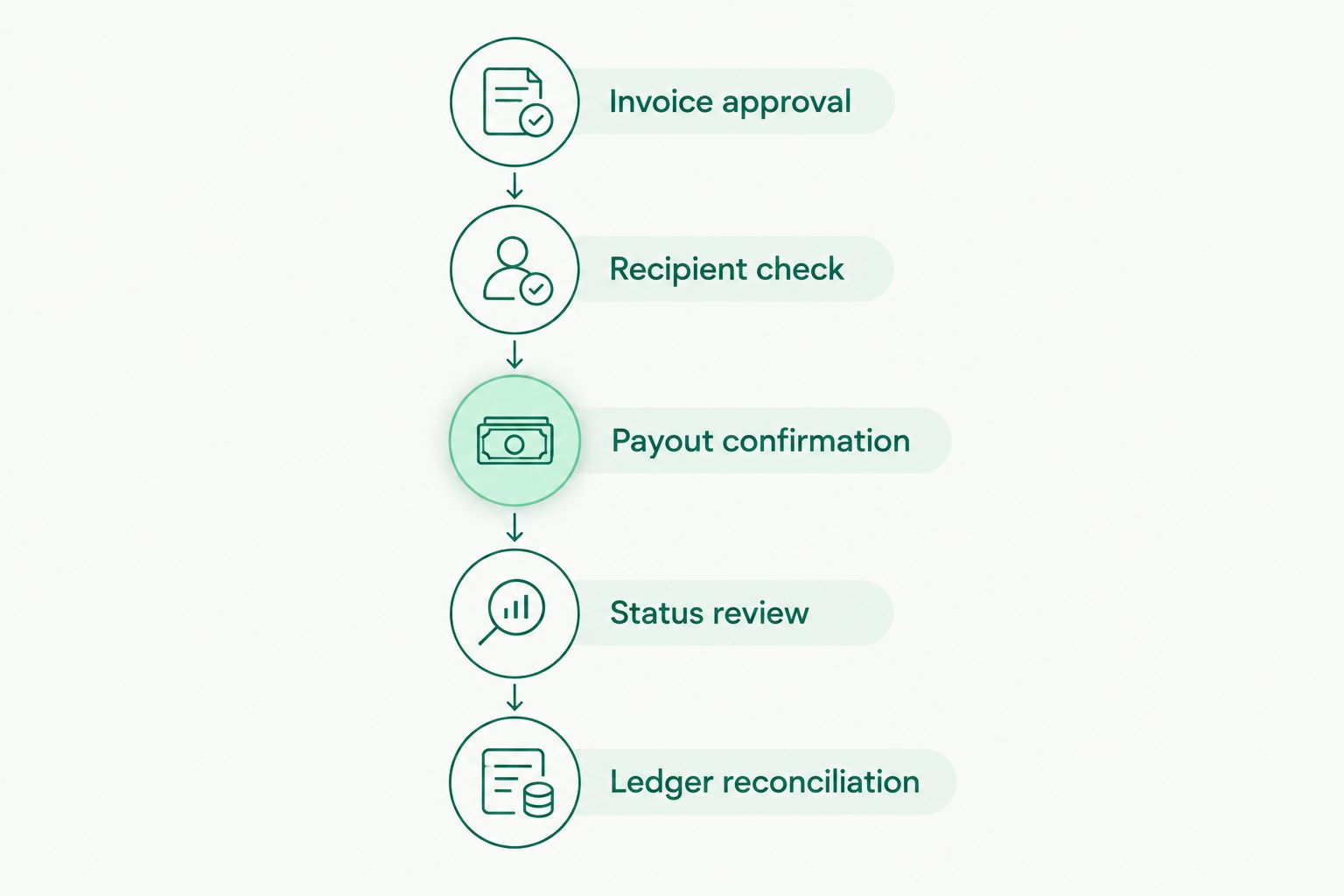
Keep invoice approval, payment execution, and reconciliation as separate records.
Compare payment options for supplier invoices
Compare methods using the supplier’s currency, supported receiving details, and your operating controls. A method that suits a US supplier won’t automatically fit a European supplier requesting EUR.
Moneyspace ACH payouts are best for verified businesses that need own-name USD details and tracked supplier payments. The limitation is scope: only supported payment methods and destinations apply, and the business per-payout cap still applies.
| Option | Best for | Practical advantage | Key limitation |
|---|---|---|---|
| ACH payout | Supported USD supplier payments through ACH | Matches suppliers that request ACH | Doesn’t settle EUR invoices through SEPA |
| Wire payout | Suppliers requesting a supported USD wire route | Provides a separate method when wire is required | Destination support and receiving instructions need confirmation |
| SEPA payout | Supported EUR supplier payments | Matches EUR invoices with SEPA receiving details | Isn’t a USD payment method |
| Moneyspace workspace | Verified businesses managing USD and EUR payments with team access | Own-name details, live status, and several company profiles under one sign-in | Business verification, destination support, and payout limits still apply |
| Manual payment register | Teams documenting approval and reconciliation in existing records | Keeps invoice evidence and payment decisions together | Doesn’t execute payments or supply live provider status |
These options aren’t all substitutes. A manual register is a recordkeeping method; ACH, wire, and SEPA are payment methods. A provider workspace can support payment execution, but you still need an accurate invoice and supplier ledger.
The provider-specific capabilities, limits, and usual timings in this guide are client-supplied facts dated October 26, 2026. Moneyspace is not a bank; account details are provided through a licensed partner after verification.
Open an account
Get your own USD and EUR account details after verification. Check support for your supplier payments.
Common mistakes manufacturers and wholesalers make
Treating a USD invoice as proof of ACH compatibility
Invoice currency and receiving method are different facts. Confirm the supplier accepts ACH and that the destination is supported before entering the instruction. Otherwise, you’re planning around an unverified route.
Paying against a purchase order without checking the milestone
A purchase order documents an order, not necessarily the event that makes payment due. Check the agreed deposit, production, dispatch, or receipt condition. Preserve the evidence supporting the payment decision.
Letting changed supplier details bypass normal checks
A familiar supplier name doesn’t validate newly supplied receiving details. Confirm changes through an established contact channel, then update your approved records. Keep recipient verification separate from invoice approval.
Confusing company access with company separation
Several company profiles under one sign-in don’t remove the need to identify the paying entity. Match the company, invoice, recipient, and accounting record before confirming. Don’t let a convenient workspace blur which company owes the payment.
Calling a payout complete when it has only started
An initiation record establishes that a payment instruction exists. It doesn’t establish completion. Give purchasing teams and suppliers the current status, and reconcile the payment when the completion record supports it.
FAQ
What’s the best ACH payout setup for manufacturers and wholesalers?
Use a setup that matches approved supplier invoices to verified ACH receiving details and records payout status. Check destination support, business payout limits, team permissions, and reconciliation requirements before choosing a provider.
Can a manufacturer outside the US pay a US supplier by ACH?
A manufacturer outside the US needs a provider that supports its business and the supplier’s ACH destination. Don’t assume eligibility from location alone; confirm verification requirements and the receiving route before committing to payment.
How long do Moneyspace supplier payouts usually take?
Moneyspace payouts usually take 1–2 business days. Incoming ACH usually takes 1–3 business days, so a supplier payment dependent on incoming funds needs separate planning for both stages.
What’s the business payout limit?
The business per-payout limit is $100,000 or €100,000, depending on currency, with no monthly business limit. The absence of a monthly limit doesn’t remove the limit on each payout.
Is ACH better than SEPA for paying suppliers?
ACH fits supported USD payments, while SEPA fits supported EUR payments. Choose the method that matches the invoice currency and the supplier’s receiving details rather than treating them as interchangeable.
Can several employees manage supplier payments?
The workspace supports owner, admin, operator, and view-only roles. Check the permissions assigned to each role; every payout, new recipient, and team grant requires 2FA.
Should I resend a payment if a supplier says it hasn’t arrived?
Check the original payout’s status before sending another payment. Compare the recipient details and transaction reference with your records, then investigate the unresolved transfer rather than creating a second instruction immediately.
One last thing
Make the invoice reference useful to the supplier, not just your accounting team. Keep the purchase-order and invoice references together in your internal payment record, and communicate the relevant reference when confirming payment. A completed transfer still needs to be matched to the right obligation.
Before your next purchasing cycle, review one completed payment from invoice approval through ledger reconciliation. Fix any missing recipient check, status record, or company identifier before applying the same process to the rest of your supplier list.