Amazon seller payouts to USD bank account: complete 2026 workflow
Instead of manually moving each Amazon disbursement between accounts, set up an eligible USD receiving destination in Seller Central, then reconcile each receipt before paying suppliers. This 2026 workflow explains the eligibility checks, account-detail setup, payment tracking, and controls that keep seller proceeds separate from operating expenses.
TL;DR
- For amazon seller payouts to usd bank account, confirm Amazon accepts the receiving provider before changing deposit details.
- Moneyspace suits sellers needing USD receipts and USD/EUR payouts; Amazon compatibility requires a separate eligibility check.
- Match the receiving account holder to the selling entity, then reconcile each disbursement against Amazon’s settlement report.
- Separate Amazon’s release date from the receiving transfer’s processing time; neither replaces the other.
Why this matters
Amazon releases seller proceeds through its disbursement process. Your receiving account is the destination, not a way to bypass reserves, verification, or marketplace payment controls. Changing account details doesn't make an unreleased settlement arrive sooner.
Moneyspace provides dedicated USD and EUR account details in your own name, plus ACH, wire, and SEPA payment services. Moneyspace is best for sellers who need USD receipts and USD/EUR payouts, subject to marketplace and account eligibility. It isn't a bank.
Account details alone don't establish Amazon compatibility. Amazon’s payment service provider requirements and your marketplace’s deposit-method requirements are separate gates. Complete those checks before replacing a working destination.
Before you start
- Seller Central access: Use an authorized login for the correct selling entity and marketplace. Have access to the existing deposit method and any verification requests.
- Verified receiving details: Obtain the account holder name, USD routing number, account number, and supporting account document. Use the business profile for business proceeds rather than assuming a personal profile is interchangeable.
- Provider eligibility: Check Amazon’s current payment service provider requirements and confirm that your proposed provider and account arrangement qualify. A valid routing number doesn't prove Amazon will accept the destination.
For your 2026 setup record, save the marketplace, legal seller name, receiving-account owner, and the date you checked eligibility. Keep this record with the verification documents, not in a publicly shared spreadsheet.
Don't close the old receiving destination during setup. Keep access until outstanding settlements, verification requests, and reconciliation questions are resolved.
Receiving-account eligibility
Confirm the destination before changing Seller Central
- Open the relevant marketplace in Seller Central. Check which entity owns the seller account and which currency the marketplace disburses.
- Review Amazon’s current payment service provider requirements. Confirm whether the proposed receiving provider qualifies for your seller arrangement.
- Ask the receiving provider whether the specific account supports Amazon marketplace proceeds through the required payment method. Describe the marketplace, account holder, and expected currency.
- Complete the receiving provider’s verification process. For Moneyspace, individuals complete an ID check and businesses complete business verification, also called KYB.
- Compare the verified account holder with the seller’s legal entity. Resolve differences before entering the account details.
Expected result: You have a verified receiving account and confirmation that the provider, account arrangement, currency, and marketplace fit together. If compatibility remains unconfirmed, stop here and retain the existing destination.
Moneyspace’s online verification covers USD and EUR access through one check. That doesn't replace Amazon’s own verification. It also doesn't establish eligibility for every country or selling entity.
For founders with several companies, select the correct company profile before copying details. Several profiles under one sign-in simplify access, but they don't make company funds interchangeable.
Seller Central deposit configuration
Enter and verify the USD receiving details
- In Seller Central, open Settings, then Account Info.
- Open Deposit Methods. Check the marketplace associated with the destination you intend to change.
- Follow the available add-or-replace flow. Seller Central’s screens and verification prompts depend on your account and marketplace.
- Copy the account holder name, routing number, and account number directly from the verified USD details. Don't copy EUR details into a USD destination.
- Compare every entry against the supporting account document. Check the account number carefully, including any leading zeros.
- Submit the details and complete the verification Amazon requests. Return to Deposit Methods to inspect the destination’s status and marketplace assignment.
Expected result: Seller Central shows the intended receiving destination for the correct marketplace, with no unresolved verification request. An entered account number is not the same as a verified destination.
Use Amazon’s actual prompts rather than treating an older screenshot as a 2026 setup checklist. If your screen doesn't match this route, search Seller Central’s help for deposit methods within the signed-in account.
Don't invent account information to satisfy a field. If Amazon requests a receiving institution’s name or address, obtain those details from the account documentation or support. Don't substitute your business address unless the field asks for it.
Before moving on, record the destination’s identifying last digits in your internal change log. Keep complete account numbers restricted to people who need them.
Disbursement tracking and reconciliation
Track release, receipt, and settlement separately
- In Seller Central, open Payments and locate the relevant settlement or disbursement record.
- Record the marketplace, settlement period, disbursement reference, currency, and released amount. Download the settlement report for your records.
- Check whether Amazon has released the payment or is still holding it within its settlement process. An expected payout is not a received payment.
- Monitor the receiving account for the corresponding receipt. Match the reference, currency, and amount rather than relying on the arrival date alone.
- Reconcile the receipt against the settlement report. Record sales, refunds, Amazon charges, adjustments, and receiving charges separately where applicable.
- Investigate any unmatched amount before using the receipt to close the settlement in your books.
Expected result: Each released disbursement has a matching receipt and a documented explanation for deductions or adjustments. You can identify whether an unresolved payment is still with Amazon or has entered the receiving process.
For Moneyspace, incoming ACH usually takes 1–3 business days; incoming wire usually arrives within a business day. These receiving-transfer timings don't include Amazon’s settlement schedule, reserves, or account reviews. Don't treat them as an Amazon payout deadline.
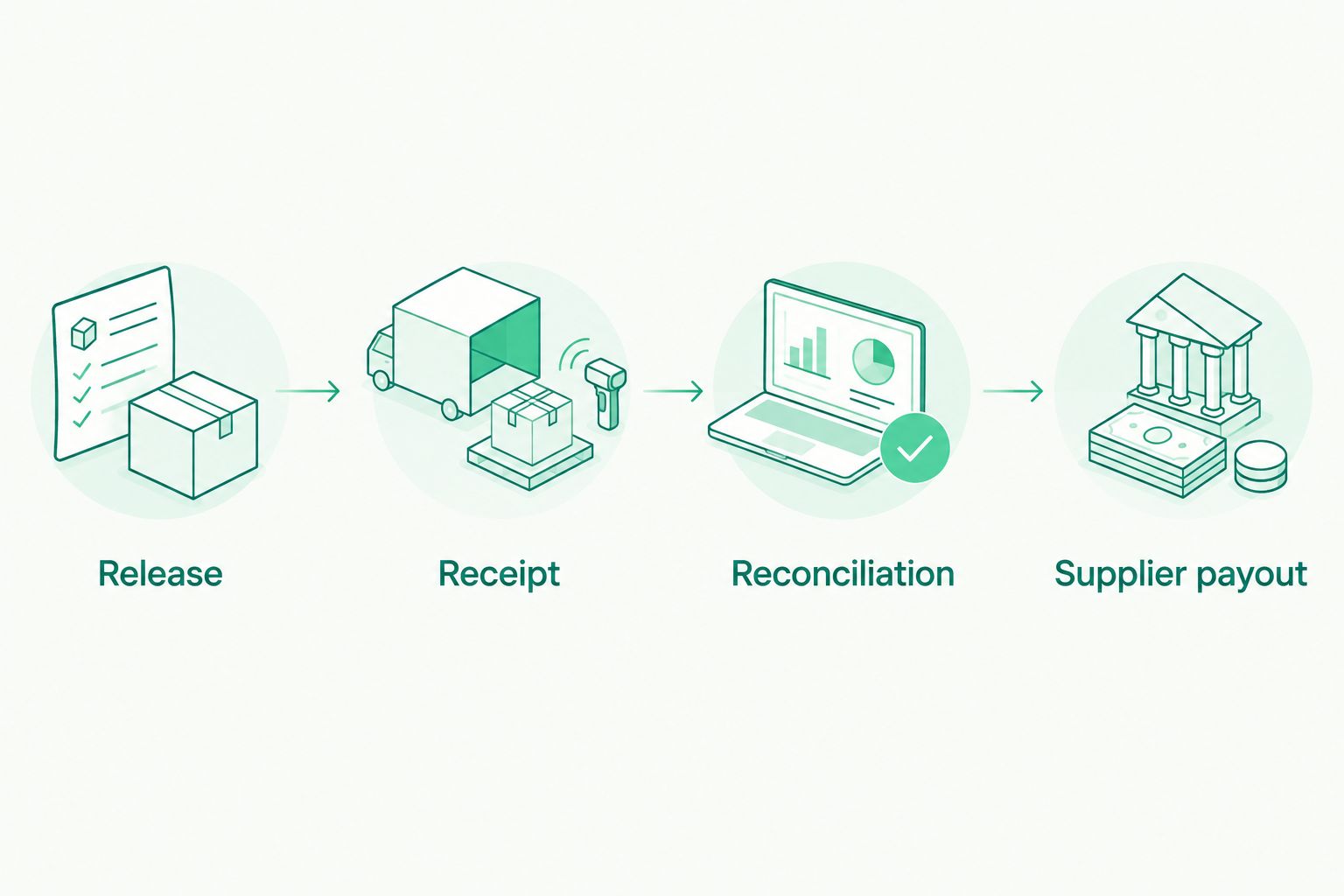
Confirm the receipt and reconcile the settlement before paying suppliers.
Configure supplier payments and team controls
- Confirm the supplier’s legal name, payment currency, destination details, and invoice reference through your normal approval process.
- Choose a supported payout method: ACH or wire for the relevant USD payment, or SEPA for the relevant EUR payment.
- Check the payment amount against the account’s limits. Moneyspace business payouts allow up to $100,000 or €100,000 per payout, with no monthly limit.
- Review the fee shown before confirmation and complete two-factor authentication. Every Moneyspace payout, new recipient, and team grant requires 2FA.
- Track the outgoing payment through Processing, On its way, and Completed. Keep its reference with the supplier invoice.
Expected result: A reconciled seller receipt funds a separately documented supplier payment, with the correct recipient, payment method, and outgoing reference.
Assign team access according to the work each person performs. The available roles are owner, admin, operator, and view-only; confirm each role’s permissions before granting access. Don't infer approval controls from a role’s name.
Variant: convert USD receipts before paying EUR invoices
Keep the same receiving and reconciliation steps when the supplier invoices in EUR. Change the outgoing leg: exchange USD to EUR inside the account, review the transaction, then prepare the SEPA payout.
The choice depends on the invoice currency, not on where the supplier’s office is located. Ask for the supplier’s payment instructions rather than guessing the correct currency or rail.
| Workflow | Best for | Advantage | Limitation |
|---|---|---|---|
| Keep USD and pay USD | Sellers with USD supplier invoices | Avoids an unnecessary USD/EUR exchange | Doesn't meet an invoice that requires EUR |
| Exchange USD and pay EUR | Sellers with EUR supplier invoices | Aligns the outgoing payment with the invoice currency | Adds an exchange transaction to review and reconcile |
Both workflows require a reconciled receipt and a supported recipient destination. Neither creates universal payout coverage.
For a 2026 operating checklist, record the decision as “USD invoice” or “EUR invoice” before preparing payment. That makes the reason for conversion visible to the next person reviewing the books.
Reconciliation controls for repeat payouts
A repeatable process needs more than an arrival notification. Keep the settlement report, incoming receipt, exchange record when applicable, supplier invoice, and outgoing payment reference together.
The central task in bank reconciliation for e-commerce businesses is matching actual money movements to accounting records. For Amazon sellers, that means distinguishing the settlement’s underlying sales and deductions from the net receipt that reaches the account.
Don't record the net disbursement as gross sales. A settlement can contain refunds, charges, and adjustments as well as sales. Use the settlement report to explain those components instead of forcing the receipt to equal revenue.
Apply the same discipline after conversion. The USD receipt, USD/EUR exchange, and EUR supplier payout are separate events. Keep their references connected without treating them as one undifferentiated transfer.
Set a consistent reconciliation owner for your 2026 records. A second team member should be able to trace a supplier payment back to its invoice and funding receipt without asking the person who sent it.
Troubleshooting
Amazon rejects the receiving destination
Check provider eligibility first, then account-holder identity, currency, and account details. Don't repeatedly submit the same destination if the underlying provider arrangement doesn't qualify. Ask Amazon which requirement failed before changing unrelated fields.
The destination shows unresolved verification
Open the request in Seller Central and supply the document Amazon specifies. Check that the document identifies the same account holder and receiving details you entered. Don't assume the receiving provider’s verification satisfies Amazon’s request.
Amazon released the payment, but no receipt appears
Confirm the actual release status, reference, destination, and transfer method. Compare the elapsed business days with the receiving method’s usual timing, not the settlement period’s end date. Request a trace through the relevant support channel if the payment remains unresolved.
The receipt doesn't match the settlement amount
Compare currency, references, settlement deductions, and receiving charges. Check whether you matched the wrong settlement or combined unrelated receipts. Preserve an unresolved difference rather than changing revenue to make the books balance.
A supplier payout can't be completed
Check the recipient details, supported destination, available currency balance, payout limit, and required 2FA. Individual limits differ from business limits: individuals have $10,000 or €10,000 per payout and $50,000 or €50,000 per month. Don't split payments to bypass controls.
Customize your workflow
Start with a manually verified settlement-to-receipt match before expanding the process. Add a separate reconciliation record for each marketplace and legal entity, even when one team manages them all.
Use the same control points when assessing multi-currency accounts for e-commerce sellers: receiving eligibility, named account details, supported payout methods, transaction visibility, and accounting records. Features don't compensate for a destination the marketplace won't accept.
Avoid assuming an automatic Amazon integration exists. This workflow uses account details, Seller Central configuration, and reconciliation; it doesn't establish an API connection or automatic supplier-payment trigger.
FAQ
Can I receive Amazon seller payouts through Moneyspace?
Confirm Amazon’s current provider requirements and Moneyspace’s acceptance of your specific marketplace proceeds before using the account. Dedicated USD details alone don't establish compatibility.
What details do I need for a USD receiving destination?
You need the verified account holder name, routing number, account number, and any supporting information Amazon requests. Copy the details from the receiving account documentation rather than reconstructing them.
Does changing my deposit method release Amazon reserves?
No. Changing the receiving destination doesn't remove Amazon’s reserves, settlement controls, or verification requirements. Check the payment’s release status separately.
How long does an incoming ACH payment take?
Moneyspace incoming ACH usually takes 1–3 business days. That timing doesn't include Amazon’s settlement schedule or time before Amazon releases the payment.
Can I convert USD seller proceeds to EUR for suppliers?
Moneyspace supports USD/EUR exchange inside the account and SEPA payouts to supported destinations. Reconcile the USD receipt first, then retain separate exchange and supplier-payment records.
Can several companies share one sign-in?
Moneyspace supports several company and personal profiles under one sign-in. Select the correct legal entity’s profile for each receipt and payment; shared access doesn't combine company ownership.
What should I check before switching destinations in 2026?
Confirm provider eligibility, account ownership, currency, marketplace assignment, and outstanding verification requests. Keep access to the previous destination until outstanding settlements and reconciliation questions are resolved.
One last thing
A successful receipt doesn't prove your accounting is correct. Before expanding the workflow, trace one completed settlement through the report, receipt, any exchange, and supplier payout. That single end-to-end check exposes missing records that an account balance won't show.