Automatically convert stablecoin payouts to EUR on arrival

Instead of manually converting each stablecoin payout, use an arrival-triggered conversion rule only where your provider explicitly supports it, then route the resulting EUR through SEPA. To convert stablecoin payouts to EUR automatically in 2026, confirm the asset, network, conversion trigger and EUR destination before enabling any rule; USD/EUR exchange alone doesn't establish that capability.
TL;DR
- To convert stablecoin payouts to EUR automatically, verify arrival-triggered conversion before connecting a receiving wallet.
- Moneyspace supports USD/EUR exchange and SEPA payouts; those capabilities don't establish automatic stablecoin conversion.
- Keep receipt, conversion and EUR delivery as separate checkpoints, with a stop condition for each.
- Require explicit authorization for payouts; Moneyspace requires 2FA for every payout.
Why this matters
A stablecoin receipt, a conversion into EUR and a SEPA payout are different events. Automating the first doesn't prove that the other two happen automatically. Your workflow needs a defined handoff between each stage.
Moneyspace is best suited to freelancers and businesses that need their own USD and EUR account details, USD/EUR exchange and supported payouts. Treat the Moneyspace account as a possible EUR receiving or payout component, not evidence of an arrival-triggered stablecoin conversion feature.
A wallet balance also isn't a completed EUR payment. Your invoice reconciliation should distinguish the asset received, the conversion result and the final EUR destination. Otherwise, a successful receipt can hide an unfinished payment.
Before you start
Use this 2026 setup checklist before you accept a production payout:
- Access and verification: Have access to the sending platform, the receiving wallet, the conversion provider and your intended EUR destination. Complete the required verification without assuming approval or a completion deadline.
- Written support confirmation: Confirm the exact stablecoin and network, account eligibility, EUR conversion support and permission to use your chosen destination. A matching asset name doesn't establish network compatibility.
- The authorization gotcha: Confirm whether conversion and external payout have separate authorization requirements. Moneyspace requires 2FA for every payout, new recipient and team grant, so don't design an unattended payout path that bypasses those checks.
Keep a sample payout reference, your EUR beneficiary details and a reconciliation record ready. Don't send funds until the receiving instructions match the intended asset and network.
The configuration names below describe workflow requirements, not verified buttons or menu labels in any provider's interface. Follow the provider's current documentation for the actual controls. If the required control doesn't exist, stop rather than substituting a different feature.
Receipt trigger
The trigger should identify an eligible incoming payout, not simply detect that a wallet balance changed. A balance change doesn't, by itself, establish the sender, purpose or conversion eligibility of the funds.
- Select the receiving route. Confirm the exact asset and network with both the sender and receiving provider. Copy the receiving instructions from the provider rather than reusing details from an unrelated payout.
- Define the eligible receipt. Use the provider's documented event for a receipt that is eligible for conversion. Don't replace its settlement requirements with your own assumed waiting period.
- Record the receipt reference. Associate the provider's transaction reference with the client, invoice or platform payout it belongs to. Keep that association through conversion and delivery.
- Define duplicate handling. Require the workflow to recognize a receipt it has already processed. If the automation offers no documented duplicate protection, retain manual review before conversion.
- Set an exception route. Send unsupported assets, unmatched receipts and restricted transactions to review instead of trying to convert them.
Expected result: An eligible receipt enters the conversion workflow once, with a traceable reference. An ineligible or unmatched receipt stops without creating a conversion instruction.
For your 2026 operating record, save the provider's supported route and trigger documentation alongside the rule. This makes later changes easier to identify without relying on someone's memory of the original setup.
EUR conversion rule
Automatic conversion needs its own supported instruction. A wallet, a currency balance and a manual exchange screen aren't substitutes for an arrival-triggered rule.
- Choose EUR as the output. Confirm that the provider converts the received asset into EUR. A conversion into USD followed by USD/EUR exchange is a different workflow with another handoff.
- Define the eligible amount. Decide whether the rule should convert the full eligible receipt or a specified portion, using only settings the provider actually supports. Preserve funds needed for any applicable transaction requirements.
- Review execution terms. Read how the provider determines the conversion result and handles unavailable quotes or interrupted processing. Don't assume the receipt timestamp fixes the exchange terms.
- Set the stop condition. Require a review state when conversion can't proceed under the authorized terms. Don't configure an alternative asset or currency as an unnoticed fallback.
- Test the record chain. Confirm that the conversion result remains linked to the original receipt and shows the resulting EUR amount.
Expected result: The eligible receipt produces a documented EUR conversion result, or the workflow stops with a reason you can investigate. A failed conversion doesn't appear as a completed EUR payment.
Keep the process visible as three separate checkpoints: Receipt, Conversion and EUR delivery. The middle checkpoint is essential; it prevents an incoming transfer from being mistaken for spendable EUR.
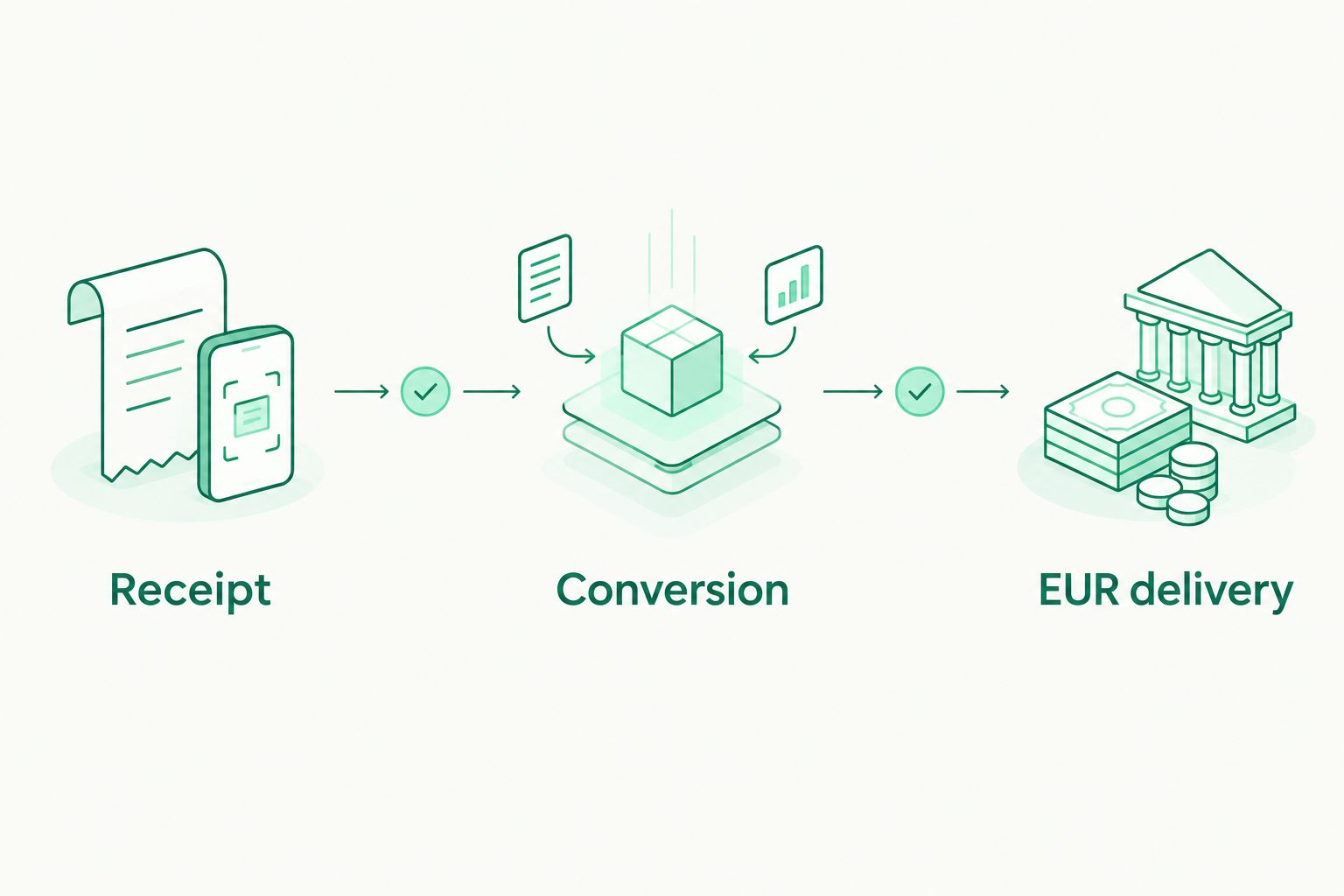
A successful receipt doesn't establish that conversion or EUR delivery has finished.
EUR destination and authorization
Choose the EUR destination before enabling the receipt rule. Confirm that the conversion provider accepts that destination and that the receiving provider accepts the incoming payment's source and purpose.
- Copy your EUR details. Use the beneficiary name, IBAN and BIC supplied for the verified account. Don't substitute another person's details to work around a name mismatch.
- Confirm the delivery method. Establish whether EUR arrives through SEPA or remains as a balance with the conversion provider. An internal EUR balance isn't the same as an external payout.
- Separate delivery from onward payment. Decide whether you need only EUR receipt or also a later supplier or team payout. Each additional payment needs its own recipient and authorization checks.
- Apply the required authorization. For a Moneyspace payout, complete 2FA. Don't assume an arrival-triggered conversion rule authorizes that later action.
- Check relevant limits. Individuals have a €10,000 per-payout limit and a €50,000 monthly limit. Businesses have a €100,000 per-payout limit and no monthly limit.
Expected result: EUR reaches the intended destination through a supported route, while any onward payout remains subject to its own controls. Your record identifies which organization is responsible for each stage.
Incoming SEPA payments usually arrive within a business day. Payouts usually take 1–2 business days. Those Moneyspace timings describe the relevant payment stages, not the total duration of an external stablecoin conversion workflow.
Test record and exception handling
A successful test must demonstrate the whole route, not just that the sending wallet accepted an instruction. Use the smallest practical test permitted by the providers, after reviewing their applicable transaction requirements.
- Create the test record. Record the sender, intended asset and network, receiving destination and expected EUR route before sending.
- Run one controlled receipt. Follow the documented receiving instructions. Don't activate a recurring production schedule while the first test remains unresolved.
- Inspect every checkpoint. Match the receipt reference to the conversion result and then to the EUR delivery record. Reconcile the actual EUR amount rather than copying the original invoice amount.
- Review exception behavior. Use a documented test environment where one exists. Otherwise, inspect the rule's stop and review behavior without deliberately sending an unsupported asset or using an incorrect network.
- Approve production separately. Enable the ongoing rule only after the route, authorization requirements and reconciliation record work as intended.
Expected result: You can explain where the funds are, what has completed and what still requires action. You also know how to pause the workflow without creating another conversion or payment.
For a 2026 control review, record who owns exceptions and who can change the destination. A workflow without an accountable operator is harder to resolve when a provider pauses a transaction.
Alternative: convert first, then receive EUR
If your payout source can't trigger conversion on arrival, a separate conversion provider can perform that stage before sending EUR to your account. Use this variant only after confirming the asset, network, conversion support and EUR delivery route with that provider.
Comparing bank payouts versus USDC settlement requires separating the settlement asset from the final payment method: a stablecoin receipt and a EUR SEPA receipt are different endpoints. Define which endpoint satisfies your invoice before deciding where automation should stop.
| Workflow | Best for | Advantage | Limitation |
|---|---|---|---|
| Arrival-triggered conversion | Recurring receipts with a documented conversion rule | Removes a manual conversion instruction | Depends on provider support and exception handling |
| Convert first, receive EUR | Senders or providers that can deliver EUR after conversion | Keeps your receiving workflow focused on EUR | Requires coordination with the conversion provider |
| Manual review before conversion | Irregular receipts or transactions needing approval | Gives you a deliberate review checkpoint | Requires action before EUR becomes available |
Choose the simplest supported route, not the route with the most automation. If you only need EUR receipt, don't add an onward payout. If you need approval before conversion, preserve that decision rather than treating it as a defect.
Troubleshooting
The receipt arrives, but conversion doesn't start
Check whether the provider supports an arrival-triggered conversion rule for that exact asset and network. Then inspect the receipt's eligibility status, the rule's enabled state and any review requirement. Don't send another payout to test an unresolved receipt.
EUR appears, but no SEPA payment follows
Check whether the conversion produced an internal EUR balance rather than an external payment instruction. Inspect the beneficiary, delivery method and required authorization separately. Conversion completion doesn't prove that a SEPA payout was submitted.
The same receipt appears repeatedly
Repeated notifications must not become repeated conversion instructions. Compare the receipt reference with your processed record and inspect duplicate handling. Pause the automation if it can't distinguish a repeated event from a new receipt.
The beneficiary details don't match
Compare the destination's beneficiary name and account details with the verified instructions. Ask the relevant provider how it handles the mismatch. Don't edit the name to conceal a difference or redirect the payment to an unrelated recipient.
The payment remains in progress
Check the provider responsible for the current stage rather than restarting the entire workflow. Moneyspace displays payout stages as Processing, On its way and Completed. Use the payout reference when requesting help, and avoid submitting a replacement while the original remains unresolved.
Customize your workflow
Separate workflows by legal entity and payment purpose. An agency's supplier payout and a freelancer's personal receipt need distinct reconciliation records, even when the same person manages both.
Moneyspace supports several companies and personal profiles under one sign-in, with owner, admin, operator and view-only roles. Assign access according to the work each person needs to perform. Team grants require 2FA; don't share credentials to avoid that control.
For recurring team payments, the next design question is authorization and recipient management, not another conversion trigger. The guide to payout platforms for remote teams covers that adjacent workflow.
Product scope in this guide follows client-supplied Moneyspace information dated October 26, 2026. Moneyspace is not a bank. Account details are provided through a licensed partner after verification.
FAQ
Can I convert stablecoin payouts to EUR automatically?
Yes, if your provider explicitly supports an arrival-triggered conversion rule for your asset, network and account. Confirm EUR delivery separately; automatic conversion doesn't establish automatic SEPA payout.
Does Moneyspace automatically convert stablecoins to EUR?
USD/EUR exchange and SEPA payouts don't establish automatic stablecoin conversion. Confirm that specific capability before making Moneyspace part of an arrival-triggered workflow.
Can I use any stablecoin network for this workflow?
No. The sender and receiving provider must support the exact asset and network used for the payout. Don't infer compatibility from the asset name alone.
Does automatic conversion also authorize an onward payout?
No. Treat conversion and onward payout as separate actions with separate authorization requirements. Moneyspace requires 2FA for every payout and new recipient.
How long does it take to receive EUR after conversion?
Timing depends on the conversion provider and delivery route. Moneyspace incoming SEPA payments usually arrive within a business day, but that doesn't establish the duration of the preceding conversion.
Should I retry when a payout hasn't completed?
Check the original payout status before submitting another instruction. An unresolved payment needs investigation, not an automatic replacement that might duplicate it.
One last thing
The most important automation rule is the stop rule. Define what happens when conversion fails, a beneficiary changes or a receipt can't be matched. A visible pause is better than an unintended conversion or duplicate payout.