Best payout platforms for remote teams in 2026

Best for USD and EUR contractor payouts: Moneyspace. Best for currency conversion: Wise Business. Best for contractor administration: Deel. Best for employment administration: Remote. Best for PayPal-based recipients: PayPal. This 2026 guide compares payout workflows, not just the act of sending money.
TL;DR
- Moneyspace is the best payout platform for remote teams needing USD and EUR contractor payouts with team access.
- Wise Business suits currency conversion; Deel and Remote suit teams that also need workforce administration.
- PayPal suits recipients who want PayPal payments, but withdrawal is a separate step to assess.
- Choose supported payment methods and recipient destinations before comparing dashboard features.
Why this matters
Paying a remote employee isn't the same job as paying an independent contractor. A transfer sends money; payroll and workforce administration address a different set of responsibilities.
Start with the relationship. If you already manage contracts, invoices and tax records, you need payment execution. If you need help employing someone abroad, a payout-only product doesn't solve that problem.
For your 2026 shortlist, separate payment platforms from employment services before comparing them. Otherwise, you risk choosing a broader service than you need—or a transfer tool that leaves essential employment work untouched.
What makes the best payout platform for remote teams
Use these criteria to judge each option. The right platform must fit the recipient, the business and the person approving payments.
- Payment coverage: Confirm the recipient's country, currency and supported payment method. Worldwide positioning doesn't establish eligibility.
- Recipient experience: Check what recipients must provide, whether they need another account and how they access their money.
- Approval controls: Match account permissions and authentication requirements to who prepares and authorizes payouts.
- Payment visibility: Look for a fee before confirmation and a status you can follow after sending.
- Administrative scope: Decide whether you need transfers, contractor administration or employment support. These aren't interchangeable services.
- Operating fit: Check verification requirements, payout limits and how separate legal entities are managed.
Remote-team payout platforms at a glance
The table assigns each platform a distinct job. It doesn't treat a payment service and an employment service as substitutes.
| Platform | Best for | Standout capability | Key limitation or decision point |
|---|---|---|---|
| Moneyspace | USD and EUR contractor payouts | Dedicated account details, team roles and live payout status | USD and EUR only; not a substitute for payroll administration |
| Wise Business | Currency conversion within a payment workflow | International transfers and currency conversion | Confirm business eligibility and the exact recipient route |
| Deel | Contractor administration alongside payments | Contractor-management and payment workflows | Separate the contractor service you need from broader employment services |
| Remote | Employment administration across borders | Employer-of-record and workforce-management services | Payment execution alone doesn't justify choosing an employment service |
| PayPal | Recipients who want PayPal payments | Payments through the PayPal account system | Receiving a payment and withdrawing it are separate steps |
1. Moneyspace: best for USD and EUR contractor payouts
Moneyspace provides dedicated USD and EUR account details in the customer's own name. You can receive ACH, wire and SEPA payments, exchange USD and EUR, and pay out through supported ACH, wire and SEPA routes.
Moneyspace is best for remote teams that need USD and EUR contractor payouts with shared operational access. It's a payment-workflow choice, not a replacement for managing employment obligations.
Moneyspace pros
- Use account details in your own name rather than a shared payment reference.
- Assign owner, admin, operator and view-only roles.
- Manage several companies and personal profiles under one sign-in.
- See the fee before confirming and follow live payout status.
Moneyspace cons
- Currency support is limited to USD and EUR.
- Individual profiles have both per-payout and monthly limits.
- Country eligibility and destination support still need confirmation.
Business profiles support up to $100,000 or €100,000 per payout, with no monthly limit. Individual profiles support up to $10,000 or €10,000 per payout and $50,000 or €50,000 per month.
For a team paying US contractors, compare the operational requirements described in the guide to ACH payout platforms for US businesses. Recipient details, authorization and payment status deserve attention before you send.
Best for: Agencies, small and mid-size businesses, and founders managing USD and EUR contractor payments across several companies.
Verdict: Buy for a verified, supported USD and EUR payout workflow.
2. Wise Business: best for currency conversion
Wise Business combines international payments with currency conversion. It belongs on your shortlist when exchanging currencies is a central part of paying contractors or suppliers.
Start with the actual route you need. Business registration, recipient location and payment method matter more than the existence of a currency in a general product description.
Wise Business pros
- Combines conversion and international transfers in one service.
- Gives businesses a payment-focused alternative to employment administration.
- Fits comparisons where the source and recipient currencies differ.
Wise Business cons
- Business eligibility must be checked for your registration location.
- The exact currency and recipient route need separate confirmation.
- A payment workflow doesn't resolve worker classification or employment obligations.
Compare the amount leaving your business with the amount reaching the recipient. Keep conversion and transfer steps visible rather than judging the service from a single headline claim.
Best for: Businesses whose central requirement is converting currencies before paying international contractors or suppliers.
Verdict: Buy when currency conversion is the main requirement and your route is supported.
3. Deel: best for contractor administration
Deel offers contractor-management and payment services alongside broader workforce services. It fits a different buying decision from a straightforward transfer product: managing the contractor relationship as well as the payout.
For your 2026 evaluation, write down the administrative work you want the service to handle. Then assess that specific service rather than assuming every workforce feature belongs to the same arrangement.
Deel pros
- Brings contractor administration and payment workflows into the same provider relationship.
- Offers a contractor-focused path within a broader workforce platform.
- Deserves consideration when payment execution is only part of the workload.
Deel cons
- A broader platform requires a more specific service-selection decision.
- Contractor management doesn't remove your responsibility to assess the working relationship.
- Country coverage and payment options need confirmation for each engagement.
Don't buy employment services simply because the provider also supports contractor payments. Match the agreement and workflow to the people you're actually paying.
Best for: Teams that want contractor administration alongside payment execution.
Verdict: Buy when contractor administration is part of the requirement; skip for transfer-only needs.
4. Remote: best for employment administration
Remote provides employer-of-record and workforce-management services. Consider it when the question is how to employ and administer a team member across borders, rather than simply how to settle an invoice.
That distinction changes the evaluation. Employment responsibilities, service scope and country coverage take priority over a payout dashboard.
Remote pros
- Addresses employment administration rather than money movement alone.
- Offers an employer-of-record service for supported employment arrangements.
- Fits a shortlist built around managing employees across borders.
Remote cons
- An employment service isn't a direct substitute for a payment-only product.
- Country and service coverage need checking before you commit.
- You still need to understand which responsibilities the agreement assigns to each party.
Ask who handles each required employment task. A clear responsibility split is more useful than a long feature list when you're choosing an employment provider.
Best for: Businesses seeking employment administration for team members in supported countries.
Verdict: Buy for a defined employment need; skip if you only need contractor transfers.
5. PayPal: best for recipients who want PayPal payments
PayPal supports payments through its account system. It belongs on the shortlist when the recipient specifically wants that payment experience and can receive and withdraw funds in their location.
Treat recipient preference as a starting point, not the whole decision. Your payment process should account for what happens after the payment reaches the recipient's account.
PayPal pros
- Fits recipients who already use and want PayPal.
- Supports an account-based payment workflow.
- Gives teams an option to evaluate when a recipient requests it directly.
PayPal cons
- Receipt and withdrawal are separate parts of the recipient journey.
- Country, currency and withdrawal support require checking.
- Recipient preference doesn't establish suitability for every team member.
Ask the recipient how they'll access the funds. Don't make assumptions based on another contractor's experience in a different country.
Best for: Teams paying recipients who explicitly prefer PayPal and have confirmed their local access requirements.
Verdict: Buy for a confirmed recipient preference; skip as an untested default for everyone.
How the ranking works
This 2026 ranking separates providers by the job you need done: USD and EUR payouts, currency conversion, contractor administration, employment administration or recipient-led account payments.
The criteria are payment coverage, recipient experience, approval controls, visibility, administrative scope and operating fit. There is no invented testing score or claim that one provider wins every route.
Choose the category first. Then confirm eligibility, payment methods and the service agreement for the specific platform you're considering.
Keep payment records separate from payment methods
A payment method answers how money moves. It doesn't, by itself, answer how your business should document a contractor relationship or handle reporting obligations.
Keep contracts, invoices, payment confirmations and recipient records connected. The person reconciling a payment should be able to identify the work, the recipient and the legal entity that paid.
The distinction also matters for 1099 reporting for contractor payments: choosing an account-based payment app doesn't settle which reporting rules apply. Assess the payer, recipient and payment arrangement separately, with qualified tax advice where needed.
For your 2026 process, assign responsibility before the first payout. Payment operations and tax reporting can involve different people, but they should work from consistent records.
Check the workflow before sending a full payment run
Use a repeatable sequence rather than letting each operator improvise. The following steps apply whether you're paying one contractor or coordinating a team.
- Verify eligibility. Confirm your business can use the service and that the intended recipient route is supported.
- Confirm recipient. Check the recipient's name, currency and payment details against the payment request.
- Review payment. Check the amount, displayed fee and any required conversion before confirming.
- Authorize payout. Apply your approval process and required authentication.
- Track status. Follow the transfer and retain its confirmation with the invoice.
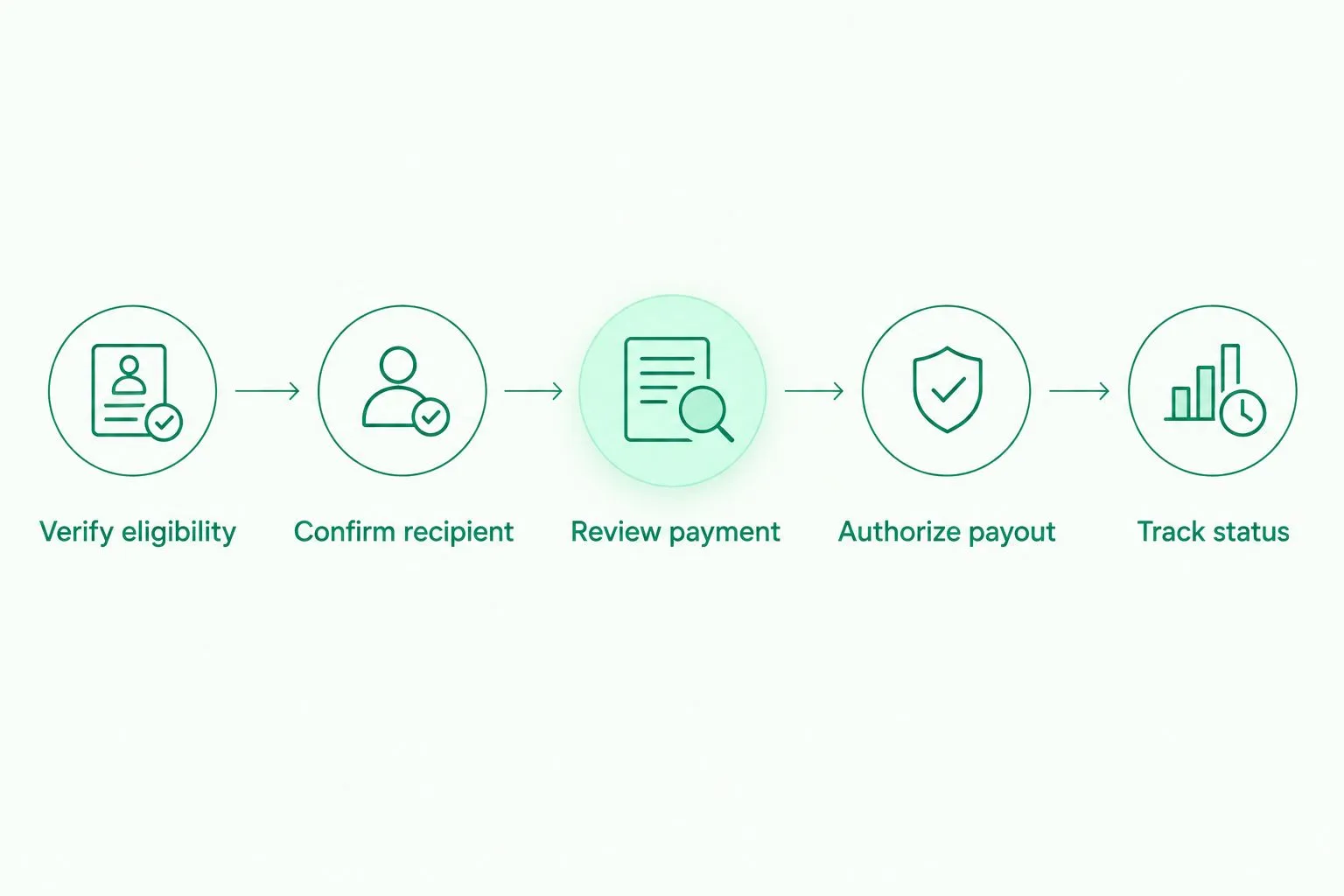
Check eligibility and recipient details before authorizing a payout.
Moneyspace requires 2FA for every payout, new recipient and team grant. Its live payout stages are Processing, On its way and Completed. Use those stages as payment information, not as a substitute for checking the recipient's details before sending.
Keep preparation and authorization responsibilities explicit. Team access is useful only when each person understands what they're allowed to do.
Match timing to your payment promise
Don't promise a contractor same-day receipt because your team can submit the payment today. Submission, processing and receipt are different events.
For Moneyspace, incoming ACH usually takes 1–3 business days. Incoming wire and SEPA payments usually arrive within a business day, while payouts usually take 1–2 business days. These are usual timings, not a fixed arrival commitment.
Build your internal schedule around the payment method you're actually using. Tell recipients when you've submitted the payout, and share the status rather than an unsupported arrival promise.
Keep funding and payout timing separate in your 2026 payment calendar. Receiving money from a client and paying a contractor are distinct steps, even when both happen through the same service.
Which payout platform should you choose?
Choose Moneyspace for supported USD and EUR contractor payouts when team access, several-company management and visible payment status are your priorities. Confirm eligibility and destination support before relying on it for a payment run.
Choose Wise Business when conversion is the central payment task. Choose Deel when contractor administration belongs in the same decision. Choose Remote when you need employment administration. Choose PayPal when a recipient specifically wants it and has confirmed access.
Don't treat this as a permanent provider ranking. The best choice is the one that matches your team's actual payment relationships and supported routes.
Open an account
Get dedicated USD and EUR account details after verification. Confirm eligibility before planning payouts.
FAQ
What's the best payout platform for remote teams in 2026?
Moneyspace is a strong fit for remote teams needing supported USD and EUR contractor payouts with team access. Wise Business, Deel, Remote and PayPal serve different conversion, administration and recipient requirements.
Is a payout platform the same as payroll software?
No. A payout platform moves money, while payroll administration addresses employment-related calculations, records and obligations. Choose based on whether you're paying independent contractors or employees.
Can contractors outside the US and Europe use Moneyspace?
Contractors outside the US and Europe are a core audience for Moneyspace. Eligibility still requires confirmation and verification; audience positioning doesn't establish approval in every country.
How long do Moneyspace payouts usually take?
Moneyspace payouts usually take 1–2 business days. Treat that as the usual timing rather than a fixed arrival commitment.
Can several people manage payouts in Moneyspace?
Yes. Moneyspace supports owner, admin, operator and view-only roles. Every payout, new recipient and team grant requires 2FA.
Is Wise Business better than Deel for remote-team payments?
Wise Business fits a conversion-and-transfer decision, while Deel fits a contractor-administration decision. Choose according to the work you need handled, then confirm your country and payment route.
Is Moneyspace a bank?
No. Moneyspace is not a bank, and account details are provided through a licensed partner after verification. Balances are not bank deposits and are not FDIC-insured.
One last thing
Choose the legal entity before choosing the payment method. Founders managing several companies should identify which company owes the invoice before an operator prepares the payout.
Moneyspace supports several companies under one sign-in, but shared access doesn't make those companies interchangeable. Keep the paying entity, invoice and payment record aligned.