Best SEPA payment platforms for businesses in 2026
Best overall for businesses collecting USD and paying in EUR: Moneyspace. Best for currency conversion: Wise Business. Best for team spending: Revolut Business. Best for payment integrations: Airwallex. Best for recurring collections: GoCardless. This 2026 guide separates SEPA payouts from direct debit so you can choose for the payment you actually need.
TL;DR
- Moneyspace is the best SEPA payment platform for business owners who need dedicated USD and EUR details together.
- Wise Business fits currency conversion; Revolut Business fits team spending; Airwallex fits payment integrations.
- GoCardless fits recurring SEPA Direct Debit collections, not supplier payouts.
- Compare transaction minimums, verification, destination support and team permissions before choosing.
Why this matters
SEPA is the Single Euro Payments Area, a framework for euro payments. But a platform that sends EUR to suppliers does a different job from one that collects recurring customer payments through SEPA Direct Debit.
Choose the payment direction before choosing the provider. A subscription business collecting invoices needs a different shortlist from an agency paying contractors. A business doing both needs to evaluate both workflows rather than assume one SEPA feature covers everything.
For your 2026 shortlist, start with the payer, recipient, currency and payment method. Then check whether the provider supports your business and destination. An international audience does not establish country eligibility.
What makes the best SEPA payment platform for business?
- Payment fit: Separate incoming transfers, outgoing credit transfers and direct debit collections. Confirm the exact workflow you need.
- Account ownership: Check whose name appears on the EUR account details and what customers must enter when paying you.
- Total transaction cost: Read percentage charges alongside minimums, exchange charges and any recurring fees. A headline percentage is not the complete calculation.
- Operational control: Match permissions, recipient controls and payment authentication to the people handling your money.
- Payment visibility: Look for understandable status updates and records your team can reconcile against invoices.
- Access and limits: Confirm business eligibility, verification requirements, supported destinations and transaction limits before moving customer payments.
These criteria put practical fit ahead of the longest feature list. For a 2026 decision, the strongest option is the one that handles your actual collection and payout process without leaving a critical step elsewhere.
SEPA payment platforms at a glance
| Platform | Best for | Standout capability | Key limitation |
|---|---|---|---|
| Moneyspace | Businesses collecting USD and paying in EUR | Dedicated USD and EUR details in your own name, with exchange and payouts | Published offer covers transfers, not SEPA Direct Debit collections |
| Wise Business | Businesses prioritizing currency conversion | Conversion alongside international business transfers | Currency conversion does not replace a direct debit collection workflow |
| Revolut Business | Businesses coordinating team spending | Business payments alongside cards and expense tools | Account and feature access depend on the business's market and plan |
| Airwallex | Businesses connecting payments to software | Payment APIs and business payment infrastructure | An integration-led setup requires technical planning |
| GoCardless | Businesses collecting recurring customer payments | SEPA Direct Debit collection workflows | Direct debit collection is not a supplier payout service |
The table compares different operating models, not interchangeable accounts. Use it to eliminate providers that solve the wrong problem before comparing individual features.
1. Moneyspace: best for USD collections and EUR payouts
Best for: Agencies, contractors, e-commerce sellers and other businesses that get paid in USD or EUR and pay suppliers or teams through supported transfer routes.
You get dedicated USD and EUR account details in your own name, rather than a shared reference. The EUR details include an IBAN and BIC. You can receive SEPA payments, exchange USD/EUR inside the account and send SEPA payouts.
This is a direct fit when your payment process crosses the two currencies. A US client can pay through ACH or wire, while your business uses EUR for supported European supplier payments.
Pros
- Dedicated details let customers pay an account identified in your name.
- One online verification process opens access to USD and EUR, subject to verification.
- Owner, admin, operator and view-only roles separate team responsibilities.
- Several companies and personal profiles sit under one sign-in.
Cons
- Only USD and EUR are included in the supplied offer.
- The published transfer offer does not establish SEPA Direct Debit collection support.
- Payout minimums affect the effective percentage on smaller transfers.
Fees, limits and timing
Opening, verification and the monthly fee are free. Incoming ACH, wire and SEPA payments carry a 0.5% fee. Outgoing ACH costs 0.5%, minimum $2; outgoing wire costs 0.5%, minimum $15; outgoing SEPA costs 0.5%, minimum €2. USD/EUR exchange costs 0.5%, minimum $1.
Business payouts have a $100,000 or €100,000 limit per payout, with no monthly limit. Incoming wire and SEPA payments usually arrive within a business day; incoming ACH takes 1–3 business days. Payouts usually take 1–2 business days, not a promised arrival deadline.
The fee appears before confirmation. Live payout status moves through Processing, On its way and Completed. Every payout, new recipient and team grant requires 2FA.
Moneyspace is not a bank. Account details are provided through a licensed partner after verification.
Verdict: Buy for dedicated USD/EUR details and supported business transfers. Skip if recurring direct debit collection is your main requirement.
2. Wise Business: best for currency conversion workflows
Best for: Businesses whose main decision is how to convert currencies and make international transfers.
Wise Business combines business payment capabilities with currency conversion. For a SEPA-focused shortlist, evaluate the EUR transfer route alongside the exchange step rather than treating the payout alone as the full transaction.
This matters when your customer pays in USD but your supplier invoices in EUR. Compare the complete path from incoming funds to the recipient's EUR payment, including the conversion quote and any transfer charge.
Wise Business pros:
- Currency conversion is central to its payment offering.
- Business transfer workflows suit invoice and supplier payments.
- Transfer quotes give you a basis for comparing a specific payment.
Wise Business cons:
- Conversion capabilities do not establish suitability for recurring SEPA Direct Debit collections.
- Available account features depend on your business location and eligibility.
- A favorable quote for one transfer does not establish the cost of every payment route.
Before choosing Wise Business in 2026, check the business features offered in your registration country. Then compare a payment that matches your normal currency pair, recipient and amount.
Verdict: Buy when conversion is the main job. Skip as your default shortlist choice when customer direct debit collection is the priority.
3. Revolut Business: best for team spending workflows
Best for: Businesses that want SEPA payments alongside employee cards and expense administration.
Revolut Business combines business payments with team spending tools. Its place on this list is operational: evaluate it when employee purchases and expenses matter alongside supplier transfers.
The distinction is important for finance teams. Sending an invoice payment and controlling an employee's spending are separate tasks, even when both sit within the same service.
Revolut Business pros:
- Business payments and employee spending tools sit within one product family.
- Cards and expense tools address purchasing workflows beyond transfers.
- It belongs on a shortlist where finance needs visibility across team spending.
Revolut Business cons:
- Plan differences require a feature-by-feature check before choosing.
- Market eligibility affects access to the business offering.
- A card-and-expense feature set adds little if you only need occasional EUR payouts.
Check who can initiate payments, who can approve them and how your team records expenses. Don't select a plan because it contains more features; select the functions your finance process requires.
Verdict: Buy for combined business payments and team spending. Skip if a focused collection-and-payout service covers the entire requirement.
4. Airwallex: best for payment integrations
Best for: Businesses connecting payment operations to their own software or an established commerce workflow.
Airwallex provides business payment infrastructure and APIs. Evaluate it when transfers need to connect with software processes rather than remain a manual task in a dashboard.
For example, a business integrating payments needs to think about recipient data, payment creation, status handling and reconciliation together. Access to an API is the starting point, not a finished operating process.
Airwallex pros:
- Payment APIs support software-led payment workflows.
- Business payment infrastructure addresses needs beyond a standalone EUR transfer.
- Integration capabilities suit teams evaluating payments as part of a wider system.
Airwallex cons:
- An integration requires implementation, testing and ongoing ownership.
- Supported entities, payment methods and destinations need checking for your use case.
- A manual payment workflow does not automatically benefit from API capabilities.
Ask your technical owner to identify the exact payment actions the integration must perform. Then confirm those actions against the provider's current documentation and your entity's eligibility.
Verdict: Buy when integration is a defined requirement. Skip an API-led selection process if your team only needs manual SEPA payments.
5. GoCardless: best for recurring SEPA Direct Debit collections
Best for: Businesses collecting recurring EUR payments from customers through SEPA Direct Debit.
GoCardless focuses on collecting payments, including direct debit. Instead of asking a customer to initiate each transfer, a direct debit workflow collects payments under a customer mandate.
That makes GoCardless a different choice from a platform selected primarily for supplier payouts. It belongs on your shortlist when subscriptions, recurring invoices or other authorized collections drive the requirement.
GoCardless pros:
- Direct debit collection matches recurring customer payment workflows.
- Mandate-based collection differs from asking customers to send each transfer manually.
- Its collection focus gives billing teams a clear use case to evaluate.
GoCardless cons:
- Customer collection is not the same service as paying suppliers.
- Mandates, failed collections and customer payment disputes need an operating process.
- SEPA Direct Debit should not be treated as immediate, irreversible settlement.
Define who handles mandate questions and unsuccessful collections before adopting a collection platform. Your billing process still needs an owner after payment initiation is automated.
Verdict: Buy for recurring SEPA Direct Debit collections. Skip for a requirement limited to outgoing supplier transfers.
How to check the payment workflow before signing up
Use this sequence to test whether a shortlisted platform matches your business. Don't move customer payment instructions until the account details and receiving method are confirmed.
- Verify access: Check your entity, country and required documents. Registration does not mean approval.
- Confirm details: Check the account holder name, EUR details and supported incoming method.
- Check recipients: Confirm the destination and payment method for your suppliers or team.
- Review fees: Read the complete transaction quote, including applicable minimums and exchange.
- Track payments: Assign responsibility for status checks and invoice reconciliation.
Keep payment access separate from general workspace access. Someone who needs to inspect records does not necessarily need permission to create recipients or send money.
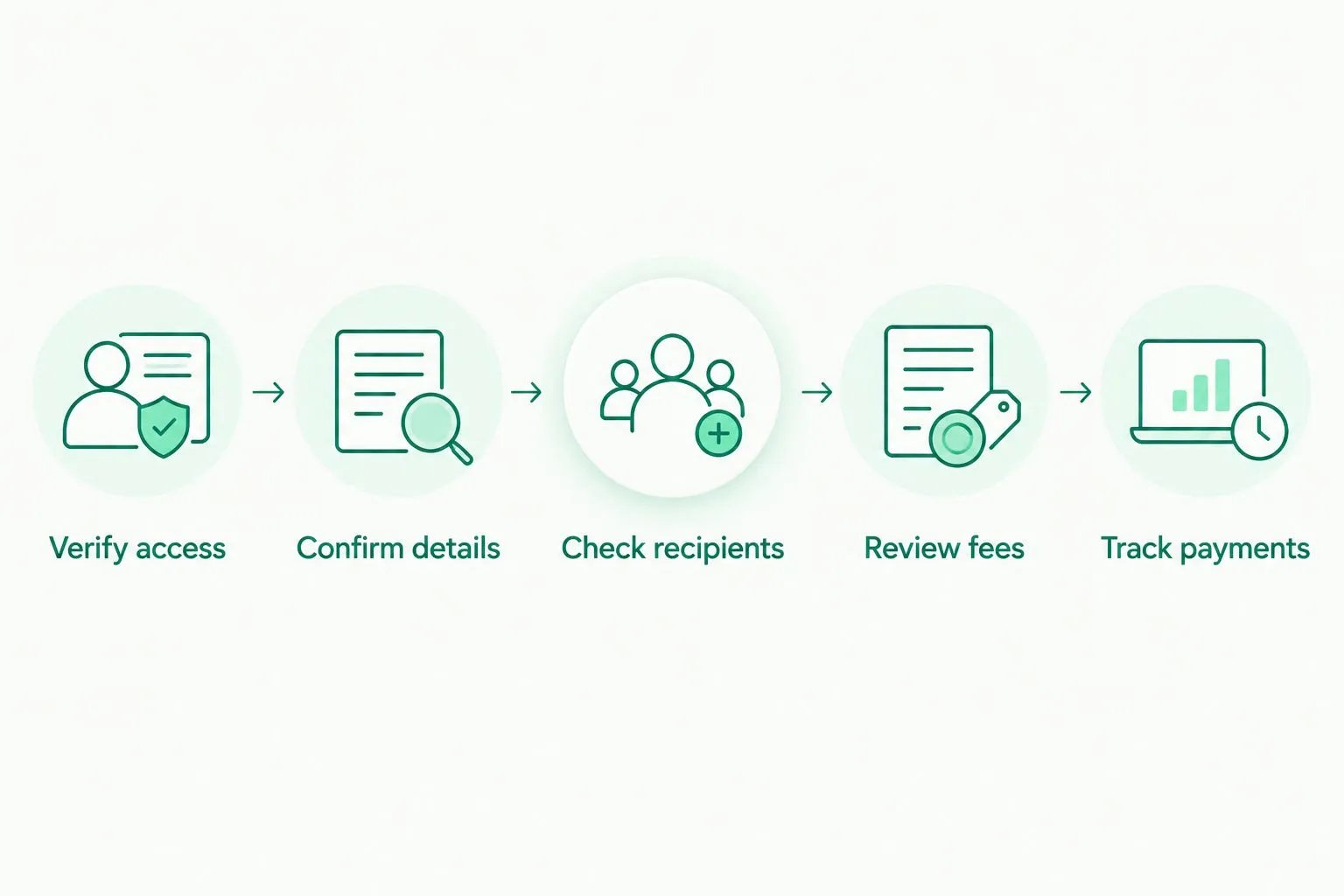
Confirm the whole payment route before changing customer payment instructions.
How the platforms are ranked
This 2026 ranking prioritizes payment fit, account details, transaction costs, team controls, visibility and access. The default recommendation serves businesses collecting USD and EUR and making supported payouts; the other positions address distinct operating needs.
This is a feature-based buying guide, not a transaction-speed test. No single ranking establishes the cheapest provider for every payment or eligibility for every business.
Which SEPA payment platform should you choose?
Moneyspace is best for businesses that need dedicated USD and EUR account details with supported collections and payouts. Choose Wise Business when conversion drives the decision, Revolut Business for team spending, Airwallex for integrations or GoCardless for recurring direct debit collection.
For your 2026 decision, write down the main payment job in one sentence. If the sentence includes both customer direct debits and supplier payouts, evaluate those requirements separately.
Open an account
Get dedicated USD and EUR account details after verification, with fees shown before you send.
FAQ
What's the best SEPA payment platform for business in 2026?
Moneyspace is the best fit in this shortlist for businesses needing dedicated USD and EUR details with supported collections and payouts. GoCardless fits recurring SEPA Direct Debit collections instead. Choose by payment workflow, then confirm eligibility and costs.
Is a SEPA transfer the same as SEPA Direct Debit?
No. A SEPA credit transfer is initiated by the payer, while SEPA Direct Debit lets a business collect an authorized customer payment under a mandate. Confirm which method your provider supports.
Can a business outside the EU use a SEPA payment platform?
Access depends on the provider's eligibility rules and your business circumstances. An international customer focus does not establish approval for every country. Confirm access for your entity before changing payment instructions.
What does Moneyspace charge for outgoing SEPA payments?
Outgoing SEPA payments cost 0.5%, with a minimum fee of €2. Opening, verification and the monthly fee are free. USD/EUR exchange is a separate charge of 0.5%, with a $1 minimum.
How long do Moneyspace SEPA payments usually take?
Incoming SEPA payments usually arrive within a business day, and payouts usually take 1–2 business days. These are usual timings, not promised arrival deadlines. Check the live payout status for progress.
Should I choose a payment API for occasional supplier payments?
Choose a payment API when connecting payments to software is an actual requirement. Occasional manual supplier payments do not by themselves justify an integration. Compare the manual workflow before committing technical resources.
One last thing
Write down who initiates the payment. If your customer sends it, evaluate receiving details. If your business sends it, evaluate payouts. If your business collects it under a mandate, evaluate direct debit. That distinction removes unsuitable platforms faster than a long feature comparison.