Best stablecoin wallets in 2026
Best overall for Ethereum app access: MetaMask. Best for Solana payments: Phantom. Best for hardware-backed key storage: Ledger. Best for shared treasury control: Safe. Choose a stablecoin wallet by the network you use, who controls the keys, and who must approve payments—not by the token’s name alone.
TL;DR
- MetaMask is the stablecoin wallet pick for Ethereum app access; Phantom fits Solana-focused payments.
- Ledger separates signing keys from your everyday computer; Safe supports shared transaction approval.
- Match the token, network, and receiving address before sending funds.
- Moneyspace fits USD and EUR payment workflows, not the self-custody wallet comparison below.
Why this matters
A stablecoin wallet manages the keys or permissions needed to move tokens. It doesn't make the token’s issuer, network, or connected application safe. Separating those risks is the starting point for this 2026 buying guide.
If your clients pay through ACH, wire, or SEPA, first decide whether you need a wallet at all. Moneyspace provides dedicated USD and EUR account details in your own name, currency exchange, and payouts through supported payment methods and destinations.
Moneyspace is best for freelancers and businesses that need USD and EUR payment account details rather than a self-custody stablecoin wallet. Moneyspace is not a bank; account details are provided through a licensed partner after verification.
What makes the best stablecoin wallet?
Use these criteria before comparing interfaces:
- Network fit: The wallet must support the exact network on which you receive and send the token.
- Key control: Know whether you, a device, several signers, or a service controls transaction authorization.
- Payment checks: You need to inspect the recipient, token, network, and requested permissions before signing.
- Recovery: Understand what restores access and what happens if you lose a device or recovery secret.
- Approval structure: Individual payments and shared company funds need different authorization arrangements.
- Application exposure: Connecting to applications adds risks beyond simply receiving and sending tokens.
No wallet wins every category. A hardware device addresses key storage; it doesn't replace a team approval policy. A shared treasury setup addresses authority; it doesn't make an incorrect recipient correct.
Best stablecoin wallets at a glance
This 2026 shortlist ranks by distinct use case, not claimed transaction speed or investment returns. Network and token support can change, so confirm the exact configuration before receiving funds.
| Wallet or setup | Best for | Standout feature | Key limitation |
|---|---|---|---|
| MetaMask | Ethereum app access | Self-custody wallet with Ethereum application connections | Application permissions require careful review |
| Phantom | Solana-focused payments | Solana wallet and application access | Network support doesn't establish token authenticity |
| Ledger | Hardware-backed key storage | Transaction signing through a separate physical device | Recovery and transaction review remain your responsibility |
| Safe | Shared treasury control | Configurable signer approval threshold | Setup and signer coordination add operational work |
These options aren't identical products. MetaMask and Phantom are wallet applications, Ledger supplies hardware signing devices, and Safe provides smart-account infrastructure. Choose the control model before choosing the interface.
1. MetaMask: best stablecoin wallet for Ethereum app access
MetaMask lets you hold keys, send supported tokens, and connect to Ethereum applications. It fits users who need a wallet for payments and application interactions rather than a receive-only address.
The important distinction is between sending a token and authorizing an application. An approval can give a contract permission to spend a token; it isn't just a login confirmation.
MetaMask pros:
- Connects to Ethereum applications through a familiar wallet workflow.
- Supports Ethereum-compatible networks that you configure and verify.
- Lets you separate activity across addresses.
- Keeps transaction authorization under your control in a self-custody setup.
MetaMask cons:
- Misleading signing requests and token approvals need active scrutiny.
- Recovery-secret exposure compromises the associated wallet.
- Selecting the wrong network creates payment and recovery problems.
Best for: Individuals who already use Ethereum applications and can inspect transaction requests.
Before connecting, verify the application independently. Don't approve a spending request merely because the wallet displays a recognizable token symbol.
Verdict: Skip MetaMask if you only need ACH, wire, or SEPA receipts; choose it for Ethereum application access.
2. Phantom: best stablecoin wallet for Solana-focused payments
Phantom provides a wallet interface for holding and transferring supported assets and connecting to applications. Its Solana support makes it a practical starting point when your payer and recipient already use that network.
Treat network support and token authenticity as separate checks. A token called USDC in a message or wallet display isn't enough evidence that you're receiving the intended asset.
Phantom pros:
- Supports Solana payment and application workflows.
- Keeps sending, receiving, and application connections in one wallet interface.
- Lets you authorize transactions without handing an application your recovery secret.
Phantom cons:
- A supported network can contain misleading or unwanted tokens.
- Application connections still expose you to signing and approval risks.
- Self-custody requires a recovery plan outside your everyday device.
Best for: Contractors or individuals whose counterparties have explicitly agreed to settle on Solana.
Confirm the recipient accepts the same token on the same network. Don't substitute another network because the wallet supports it or the token uses the same ticker.
Verdict: Skip Phantom when your payment workflow requires a different network; choose it for an agreed Solana workflow.
3. Ledger: best stablecoin wallet setup for hardware-backed keys
Ledger devices sign transactions using keys held on a separate physical device. You use compatible software alongside the device to manage accounts and prepare transactions.
That separation addresses a specific problem: keeping signing keys away from an everyday computer. It doesn't establish that a transaction, application, or recipient is legitimate.
Ledger pros:
- Separates signing keys from the computer used to prepare transactions.
- Requires interaction with a physical device to authorize transactions.
- Supports compatible wallet software for different account workflows.
Ledger cons:
- Device, application, network, and token compatibility need checking together.
- Losing both access and the recovery backup can leave funds inaccessible.
- A hardware device cannot correct a transaction you intentionally approve.
Best for: Individuals who want physical-device authorization and will maintain a separate recovery backup.
Purchase through a verified distribution channel and follow the manufacturer’s initialization instructions. Never use a recovery phrase supplied by another person or enter your recovery phrase into an unsolicited website.
Verdict: Buy a Ledger device for hardware-backed signing, not as a substitute for transaction review.
4. Safe: best stablecoin wallet setup for shared treasury control
Safe uses smart accounts with configurable transaction approval rules. A team can require approval from several signers rather than letting one person move company funds alone.
This is an authority decision, not merely a wallet preference. Define who proposes payments, who reviews them, and how the team replaces an unavailable signer before funding the account.
Safe pros:
- Supports approval thresholds across multiple signers.
- Separates shared account ownership from one employee’s everyday wallet.
- Gives teams a basis for documented payment approval procedures.
Safe cons:
- Signer coordination adds work to payment execution.
- Losing access to enough required signers can block transactions.
- Smart-account compatibility needs checking with counterparties and applications.
Best for: Businesses that need shared authorization for a stablecoin treasury.
Don't give one person control of every signer and call the result separation of duties. Store recovery material separately and document how ownership changes when someone leaves.
Verdict: Skip Safe for a simple personal receive-and-send workflow; choose it when shared approval is necessary.
How we ranked the wallets
The 2026 order reflects the criteria above: network fit, key control, payment checks, recovery, approval structure, and application exposure. It isn't a ranking of token safety or a claim that one wallet prevents losses.
MetaMask takes the Ethereum application slot. Phantom takes the Solana workflow slot. Ledger addresses physical key separation, while Safe addresses shared authority. These distinct jobs explain the order better than an unsupported overall score.
Choose custody before adding features
Self-custody puts transaction authority under your control. It also puts recovery responsibility on you. A forgotten password and a lost recovery secret aren't necessarily the same problem, and a support conversation cannot replace missing keys.
The distinction between non-custodial crypto wallets and custodial services is who controls transaction authorization—not whether the interface looks simple. Decide whether you can maintain recovery backups and review signatures before choosing extra features.
For a business, write down the consequences of absence, device failure, and staff departure. An account that only the founder can access is a different operational setup from one with documented shared approval.
Keep these controls separate:
- Access: Who can open the interface?
- Authority: Who can approve a transfer?
- Recovery: Who can restore control after a device loss?
- Records: Who reconciles each payment against an invoice?
A team needs answers to all four. Adding another signer doesn't automatically solve recordkeeping or recovery.
Set up a payment workflow before receiving funds
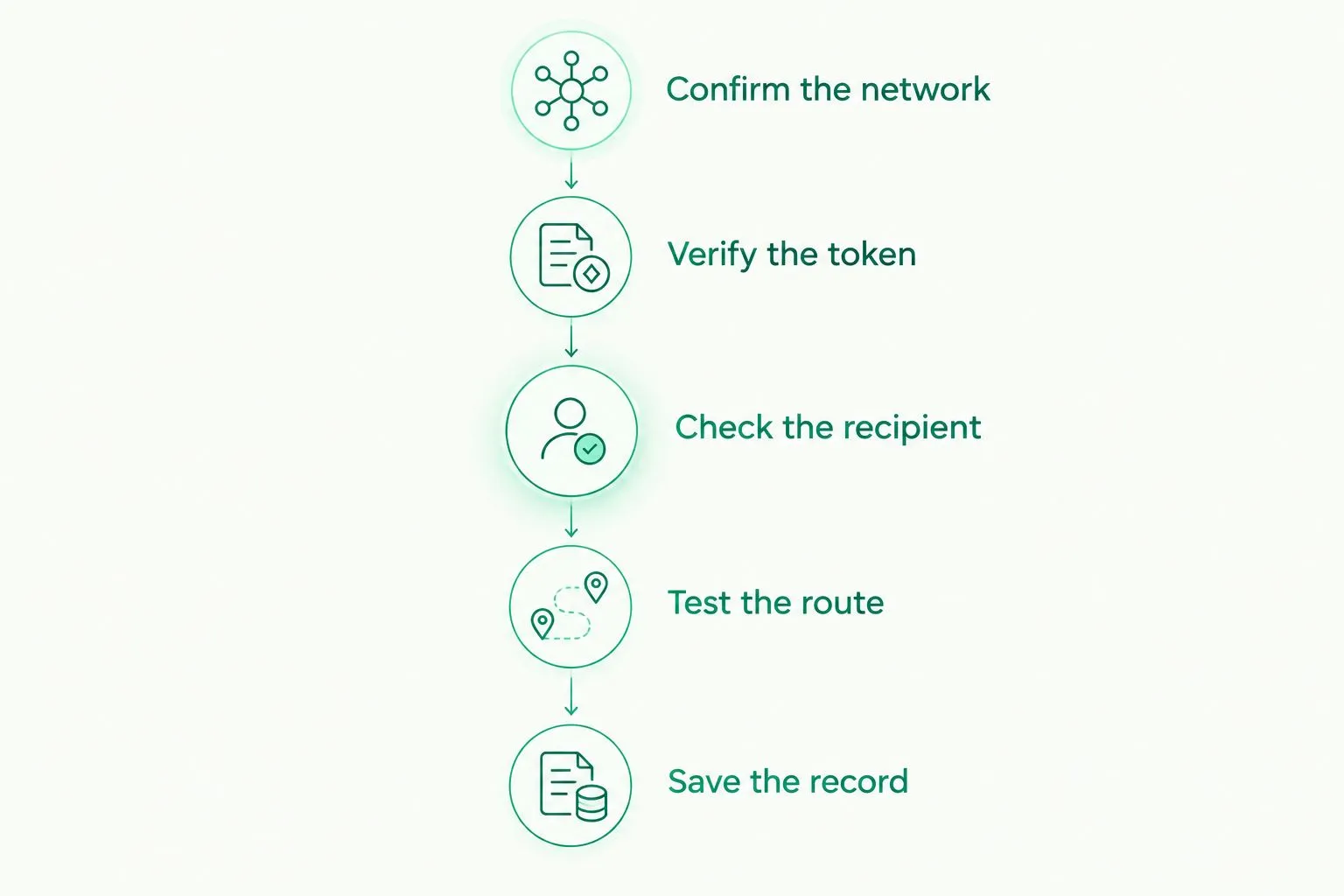
Use this sequence for your first payment arrangement in 2026. Repeat the checks when the payer, network, or receiving details change.
- Confirm the network. Agree on the blockchain explicitly, rather than assuming the token name identifies it.
- Verify the token. Confirm the intended token contract or mint through the issuer’s official information.
- Check the recipient. Compare the destination with details supplied through a trusted channel.
- Test the route. Use a small transfer before committing the full payment, while accounting for network charges.
- Save the record. Keep the transaction identifier with the invoice and payment instructions.
A test transfer checks the route you actually used. It doesn't prove a different token, address, or network will work later.
Recheck the route whenever payment details change.
For shared funds, add approval before execution and reconciliation afterward. Keep recovery secrets out of invoices, chat threads, shared spreadsheets, and support tickets.
When USD and EUR account details fit better
A wallet solves token custody and authorization. It doesn't provide ACH routing details or a SEPA receiving arrangement simply because it holds a dollar- or euro-linked token.
Moneyspace provides dedicated USD and EUR account details in your own name, rather than a shared reference. You can receive through ACH, wire, and SEPA and exchange USD/EUR inside the account. Verification happens online, with an individual ID check or business verification as applicable; approval isn't automatic.
For planning, incoming ACH usually takes 1–3 business days. Incoming wire and SEPA usually arrive within a business day, while payouts usually take 1–2 business days. These are usual timings, not fixed delivery commitments.
Individual limits are $10,000/€10,000 per payout and $50,000/€50,000 per month. Business limits are $100,000/€100,000 per payout, with no monthly limit. Confirm supported destinations before arranging a payment.
For teams, owner, admin, operator, and view-only roles support different access needs. Every payout, new recipient, and team grant requires two-factor authentication. Several companies and personal profiles can sit under one sign-in.
Open an account
Get dedicated USD and EUR account details after verification, with ACH, wire, and SEPA payment methods.
Which stablecoin wallet should you choose?
Choose MetaMask as the default for Ethereum application access. Choose Phantom when the agreed payment route is Solana, Ledger when physical key separation is the priority, and Safe when company funds require shared approval.
Don't create a wallet to solve the wrong payment problem. If a client wants to pay an invoice through ACH or SEPA, start with the receiving method they actually use. Keep that decision separate from whether you also need token custody.
FAQ
What's the best stablecoin wallet in 2026?
MetaMask is the default pick here for Ethereum application access. Phantom fits Solana-focused payments, Ledger fits hardware-backed signing, and Safe fits shared treasury approval.
Can I receive any stablecoin in the same wallet?
No. The wallet must support the relevant network, and you must verify the exact token and receiving address. A matching ticker alone isn't enough.
Is a hardware wallet safer than a software wallet?
A hardware wallet separates signing keys from your everyday computer. It doesn't prevent losses from an incorrect recipient, exposed recovery material, or a harmful transaction you approve.
Do I need the network's native token to send stablecoins?
A standard on-chain transfer generally requires a way to pay the network's transaction charge. Some account arrangements sponsor or abstract that charge, so confirm how your specific setup handles it.
What's the best stablecoin wallet for a business team?
Safe fits teams that need transactions approved by multiple signers. Define signer ownership, replacement procedures, and payment review before using it for company funds.
Can a stablecoin wallet receive ACH or SEPA payments?
A stablecoin wallet by itself doesn't provide ACH or SEPA receiving details. Those payment methods require a separate supported account or service arrangement.
Is Moneyspace a self-custody stablecoin wallet in this comparison?
No. Moneyspace is included as a USD and EUR payment-account alternative, not as a ranked self-custody wallet. Its dedicated account details support the payment workflows described above.
One last thing
A token’s name doesn't identify its payment route. In 2026, the most useful instruction on your invoice is still the exact token, exact network, and exact receiving address. Make the payer confirm all three before sending.