Can I open a multi-currency account without visiting a bank?

Yes, you can open a multi-currency account online without visiting a bank, provided the service supports your circumstances and approves your online verification. A remote application still requires identity or business checks, and online access doesn't mean every country, business type or payment destination is supported.
TL;DR
- You can open multi currency account online without visiting a bank, subject to eligibility and verification.
- Moneyspace suits freelancers and businesses needing their own USD and EUR account details for international payments.
- Online verification removes the branch visit, not the identity or business checks.
- Check payment methods, payout limits and destination support before sharing account details with clients.
Why this matters
Getting an account online solves the travel problem. Getting the right account solves the payment problem. You need details your clients can use, payment methods that match their instructions and a way to pay out to supported destinations.
Moneyspace provides dedicated USD and EUR account details in your own name after verification through a licensed partner. Its client-supplied information dated October 26, 2026 describes fully online verification for individuals and businesses. That supports a remote application, not a promise that every applicant qualifies.
Choose based on the payments you need to receive and send—not just the ability to apply online. For a freelancer outside the US or EU, the useful question is whether a client's payment can reach the correct details in the correct currency.
Can I open a multi-currency account without visiting a bank?
Yes. The supported process is an online application followed by verification and access to account details after approval. You don't need to replace the branch visit with an intermediary who applies on your behalf.
Use this sequence when applying in 2026:
- Check eligibility. Confirm that the provider supports your location, applicant type and intended use. Don't treat international audience positioning as proof of country eligibility.
- Choose the correct profile. Apply as an individual for personal activity or use the business verification process for a company. Keep the legal recipient aligned with the work or sale being paid for.
- Complete verification. Individuals complete an identity check. Businesses complete know-your-business checks, commonly shortened to KYB. Follow the document requests shown during the application.
- Confirm your details. After approval, check the account holder name, currency and payment instructions. Distinguish USD routing and account numbers from EUR IBAN and BIC details.
- Match the payment method. Give the sender the instructions for the method they will actually use. Receiving details alone don't confirm that every platform or payment route accepts them.
- Review your payout route. Check the recipient, destination, limits and displayed fee before confirming a payment. Receiving money and sending it onward are separate steps.
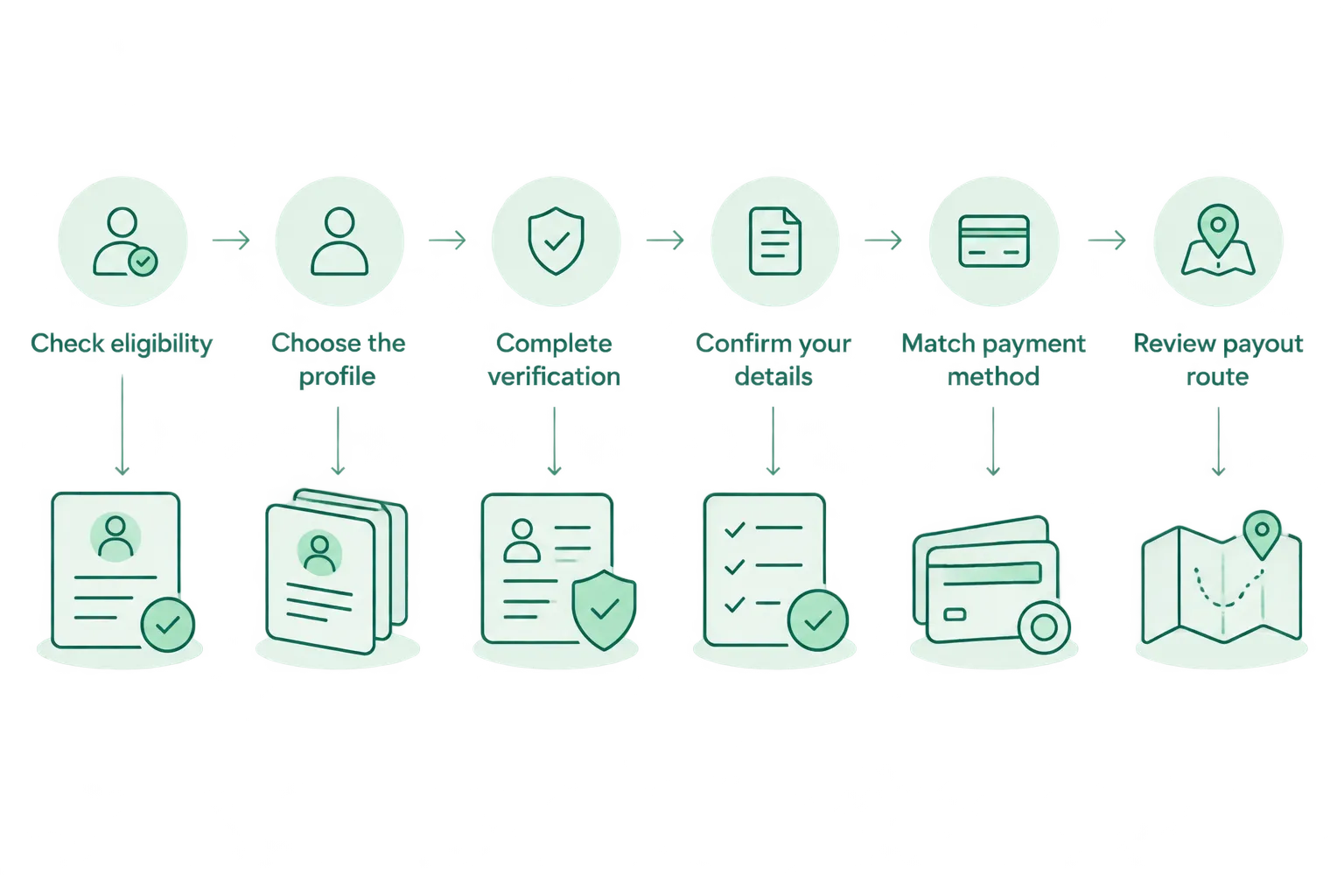
Complete verification before relying on account details for client payments.
Keep a clear distinction between registration and approval. Creating a sign-in doesn't establish that verification is complete or that your account details are ready to share.
An online process also doesn't eliminate questions about your business. Answer the actual requests in the application rather than relying on a generic document checklist that might not match your profile.
Individuals: USD 10,000 or EUR 10,000 per payout
Moneyspace's individual multi-currency account limits are USD 10,000 or EUR 10,000 per payout and USD 50,000 or EUR 50,000 per month. These are payout limits, not a promise about the size of any incoming payment.
Best for: freelancers, remote workers and contractors receiving USD or EUR from international clients. Dedicated details in your own name let you provide the account holder information associated with your profile rather than a shared payment reference.
The limitation is the payout ceiling. Check both the size of the payment you intend to send and your monthly payout needs before choosing an individual profile for your work.
Individual identity checks often take minutes, according to the client-supplied information. That isn't an approval deadline, and it doesn't establish the timing for a business application.
Businesses: USD 100,000 or EUR 100,000 per payout
The business payout limit is USD 100,000 or EUR 100,000 per payout, with no monthly payout limit. Business applicants complete KYB rather than relying only on an individual identity check.
Best for: small and mid-size businesses, agencies and e-commerce sellers paying suppliers or teams internationally. Founders with several companies can manage multiple company profiles and personal profiles under one sign-in.
Team roles include owner, admin, operator and view-only. Every payout, new recipient and team grant requires two-factor authentication, or 2FA. Assign access according to the work each person needs to perform.
The trade-off is that business verification is a separate process. Don't use the timing described for an individual's ID check as a deadline for a company's KYB review.
Which profile matches your payment activity?
This comparison uses the client-supplied limits and features dated October 26, 2026. Neither profile removes the need to confirm eligibility and supported destinations.
| Profile | Best for | Per-payout limit | Monthly payout limit | Main consideration |
|---|---|---|---|---|
| Individual | Freelancers, remote workers and contractors | USD 10,000 or EUR 10,000 | USD 50,000 or EUR 50,000 | Individual identity verification and payout ceilings |
| Business | Companies, agencies and e-commerce sellers | USD 100,000 or EUR 100,000 | No monthly payout limit | Business verification and appropriate team permissions |
Select the profile that matches the actual applicant. A higher payout limit isn't a reason to describe personal activity as company activity or submit information for the wrong legal recipient.
What account details do you get online?
For USD, the supplied offering includes dedicated routing and account numbers in the customer's own name. For EUR, it includes dedicated IBAN and BIC details. One online verification process opens access to both currencies after approval.
An IBAN identifies an account for relevant payments; a BIC identifies the financial institution used in the payment instructions. Copy the details exactly as displayed. Don't substitute USD instructions for EUR instructions or assume a currency label identifies the payment method.
The supported receiving methods described by the client are ACH, wire and SEPA. The supported payout methods are also ACH, wire and SEPA. USD/EUR exchange takes place inside the account.
These capabilities answer different needs:
- Receiving details: Give a client the instructions needed to pay you.
- Currency exchange: Change USD to EUR or EUR to USD inside the account.
- Payouts: Send funds to a supported recipient using the available payment method.
- Live status: Follow a payout through Processing, On its way and Completed.
Don't treat those payout labels as a verification tracker. They describe the progress of a payment after you initiate it, not whether an application has passed review.
Why online account opening varies
Remote access describes how you apply. It doesn't make every application or payment requirement identical. Check these factors before committing your client billing or supplier payments:
- Applicant type. Individuals complete an ID check; companies complete KYB. The processes aren't interchangeable.
- Location and eligibility. A worldwide audience doesn't establish support for every country or applicant. Confirm your circumstances directly.
- Required currency. This offering covers USD and EUR. Don't assume another currency is included because the service is described as multi-currency.
- Payment method and destination. Match ACH, wire or SEPA to the intended payment and confirm destination support. A supported method isn't proof of unrestricted destination coverage.
- Payout requirements. Individual and business limits differ. Compare those limits with your intended outgoing activity before routing payments through the account.
For a 2026 application, answer these questions before sending account details to a client. Finding a mismatch after an invoice has been issued adds an avoidable change to the payment instructions.
How long does online verification take?
Individual ID checks often take minutes, but approval has no promised deadline. Business verification follows KYB requirements and doesn't inherit the timing described for an individual ID check.
Keep verification time separate from transfer time. Incoming ACH usually takes 1–3 business days; incoming wire and SEPA usually arrive within a business day. Payouts usually take 1–2 business days.
Those are usual payment timings, not application-processing estimates. Allow for the distinction when agreeing on an invoice due date or planning a supplier payment.
Can I receive USD and EUR after one verification?
USD and EUR are covered by one online verification process after approval. You receive the relevant details for each currency rather than using the same instructions for every payment.
Before sharing those details, confirm the account holder name and the client's sending method. Ask a platform to confirm that it accepts the supplied details rather than assuming compatibility from the currency alone.
For your 2026 payment setup, keep separate USD and EUR instructions wherever you store invoice information. Clear currency labels help you send the correct instructions without changing the underlying details.
What should I check before opening an account?
Moneyspace is a practical fit for freelancers and businesses that need dedicated USD and EUR account details online. Its useful features are receiving details in your own name, supported international payment methods, in-account exchange and visible payout status.
Its boundaries matter just as much. It supports the stated currencies and payment methods, requires verification, applies payout limits and doesn't establish universal country or destination coverage.
Before you apply, work through this checklist:
- Confirm your location and applicant type are supported.
- Confirm you need USD, EUR or both—not an unlisted currency.
- Identify how clients or platforms will send payments.
- Compare your outgoing activity with the applicable payout limits.
- Decide who needs team access and which role fits each person.
- Review the displayed transaction fee before confirming each payment.
Don't assume one payment's fee applies unchanged to every later transaction. Review the confirmation screen for the transaction you're making, including any applicable minimum.
Open an account
Apply online for dedicated USD and EUR account details, subject to verification and eligibility.
FAQ
Can I open a multi-currency account entirely online?
Yes, you can complete an online application and verification without a branch visit when the provider supports your circumstances. Approval and access to account details remain subject to verification and eligibility.
Do I need separate verification for USD and EUR?
Moneyspace uses one online verification process for access to USD and EUR after approval. Individuals complete an ID check, while businesses complete KYB.
Can I apply if I live outside the US or EU?
Freelancers, remote workers and contractors outside the US and EU are part of the intended audience. Confirm support for your location and circumstances before applying; that audience positioning doesn't establish universal eligibility.
How quickly will my online application be approved?
Individual ID checks often take minutes, but there is no promised approval deadline. Business KYB is a separate process, so don't apply the individual timing to a company application.
Will the account details be in my own name?
The supplied offering provides dedicated USD and EUR account details in the customer's own name after verification. These aren't shared details that identify you only through a payment reference.
Can I pay international suppliers after opening the account?
You can make payouts using supported ACH, wire and SEPA routes and destinations after verification. Check the recipient, applicable limits and displayed fee before confirming.
How long do payments take after verification?
Incoming ACH usually takes 1–3 business days, while incoming wire and SEPA usually arrive within a business day. Payouts usually take 1–2 business days; application review is separate from these payment timings.
One last thing
Your account holder name deserves the same attention as the currency. Before issuing payment instructions, compare the verified recipient name with the person or company named on your invoice. Then check the payment method, not just whether the sender selected USD or EUR.
Moneyspace is not a bank. Account details are provided through a licensed partner after verification. Keep that distinction clear when deciding whether the service matches your payment needs.