How long does an ACH payout take to clear?
An ACH payout usually takes a few business days, but the sending provider sets the delivery estimate. The service covered here lists outgoing payouts at usually 1–2 business days in 2026, while incoming ACH payments usually take 1–3 business days. Account verification is separate, and submitting a payout doesn’t mean the recipient already has usable funds.
TL;DR
- How long does an ACH payout take to clear? Moneyspace lists outgoing payouts at usually 1–2 business days.
- Incoming ACH payments usually take 1–3 business days; receiving money and sending a payout are separate stages.
- Count business days, check the payment status, and confirm receipt before treating an invoice as settled.
- Moneyspace suits freelancers and businesses needing USD ACH payouts with live status, not a fixed arrival deadline.
How long does an ACH payout take to clear?
For Moneyspace, outgoing payouts usually take 1–2 business days. Incoming ACH payments usually take 1–3 business days. These are separate timing windows, not interchangeable descriptions of the same transfer.
The distinction matters when you receive a client payment and then pay a contractor. Your incoming payment must arrive before you can use those funds for a separate payout.
| Payment stage | Client-supplied usual timing | Best for understanding | Limitation |
|---|---|---|---|
| Incoming ACH | 1–3 business days | When a client’s USD payment reaches your account | Not the delivery estimate for your outgoing payout |
| Outgoing payout | 1–2 business days | When a payment you send is expected to arrive | A usual window, not a fixed deadline |
| Incoming wire or SEPA | Usually within a business day | Comparing receipt methods for the appropriate currency | Not evidence that an outgoing ACH payout arrives as quickly |
The timing figures above come from the client’s service facts dated October 26, 2026. They describe this service, not every ACH provider or every payment platform.
What does “clear” mean for your payment?
People use “clear” to mean different things: the sender submitted the instruction, the payment left the sender’s provider, or the recipient can use the money. Those events aren’t identical.
For paying an invoice, use recipient receipt as your practical completion check. A screenshot showing that the sender started a payment doesn’t establish that the recipient has received it.
Why this matters
If you’re a freelancer waiting for a client payment, the incoming ACH window affects when you can use that money. If you’re paying suppliers or a remote team, the outgoing payout window affects when recipients should expect it.
Keep those responsibilities separate. Tell your client which account details to use, and tell your recipient the applicable payout estimate without turning it into a fixed arrival promise.
For your 2026 cash-flow planning, don’t schedule an outgoing payment solely around an incoming payment’s expected arrival. Check that the incoming funds have actually arrived before committing them to another payment.
A practical payment record should distinguish:
- The invoice due date.
- The date the sender submitted the payment.
- The payment’s current status.
- The date the recipient confirms receipt.
Those entries answer different questions. Combining them into a single “paid” date makes a delayed transfer harder to investigate.
Outgoing ACH payouts: usually 1–2 business days
Moneyspace lists outgoing payouts at usually 1–2 business days. Use that window when discussing a supported ACH payout with your supplier, contractor, or team member.
The benefit is a stated delivery window paired with live payout status. The limitation is that a usual timeframe doesn’t establish an exact arrival hour or remove the need to check the recipient’s details.
Before sending, confirm that you’re looking at an outgoing payout estimate. Don’t substitute an incoming ACH estimate or another payment method’s timing because it appears faster.
Follow the payout through its status stages
The service displays these payout statuses:
- Processing: The payout is still in progress. Don’t describe it to your recipient as received.
- On its way: The payout has progressed, but this status is not the same as recipient confirmation.
- Completed: Check this final displayed status alongside the recipient’s confirmation if there’s a delivery question.
These labels help you describe progress precisely. They don’t provide a separate delivery deadline for each stage.
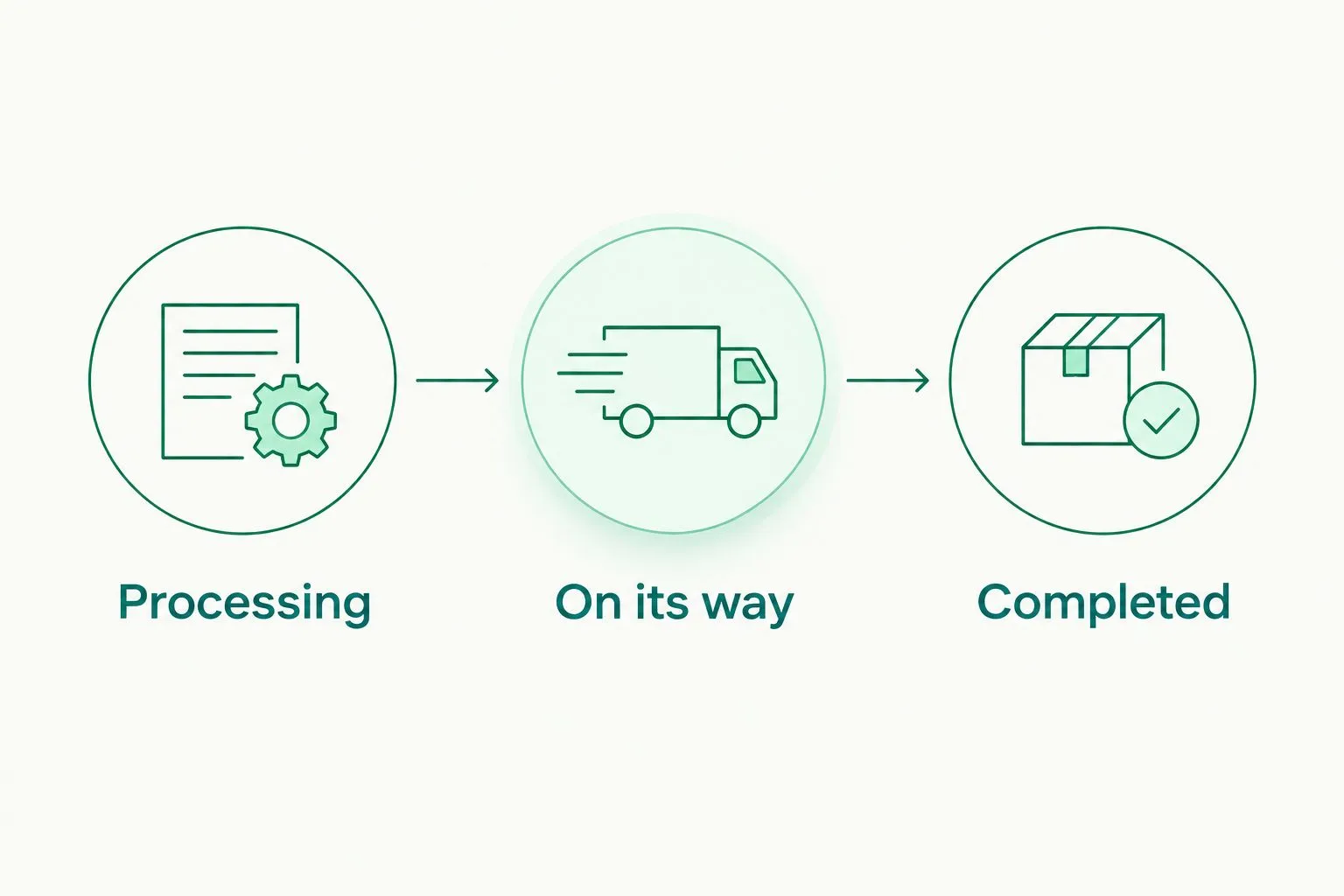
Track the payout’s progress without treating submission as recipient receipt.
Keep the transfer reference and submission date with the invoice. If your recipient asks where the payment is, you can provide the current status rather than repeating the original estimate.
Incoming ACH payments: usually 1–3 business days
Incoming ACH payments usually take 1–3 business days. This is the relevant window when a US client or platform sends USD to your account details.
Ask the sender to confirm that the payment was actually submitted. An approved invoice, scheduled payment, or platform payout notification doesn’t necessarily describe the same processing event.
The advantage of dedicated USD details is that you can give your payer account information in your own name. The limitation is that having those details doesn’t control when the payer initiates the payment.
For a useful payment confirmation, ask for:
- The payment method used.
- The submission date.
- The recipient name and account details used.
- The transfer reference, if available.
- The sender’s current payment status.
Avoid asking only whether the invoice is “paid.” That answer can leave you unable to distinguish an internal approval from an actual transfer.
Receiving funds and paying out are separate transfers
Receiving a client payment and forwarding funds to a contractor involves separate payment stages. The incoming ACH estimate doesn’t cover the later outgoing payout.
In your 2026 payment schedule, record each stage independently. Don’t describe the entire sequence as a single ACH transfer or assume both stages finish within the outgoing payout window.
This distinction also improves communication. Your client needs the correct receiving details; your contractor needs the outgoing payment’s status and expected delivery window.
Why ACH payout timing varies
ACH timing depends on more than the moment you press send. Check these factors before deciding that a payout is late:
- Business days: Weekends and applicable banking holidays affect ACH processing schedules. Calendar days and business days aren’t interchangeable.
- Submission cutoff: A provider’s cutoff determines whether an instruction enters its current processing cycle. Use the sender’s actual cutoff rather than assuming midnight.
- Payment direction: Incoming ACH and outgoing payouts can have different published windows. Match the estimate to the transfer you’re tracking.
- Recipient details: An incorrect routing number, account number, or recipient detail can prevent successful delivery and require investigation.
- Verification and review: Account verification and payment review are distinct from network transit. Don’t treat an unapproved account setup as an active payout.
- Recipient-side posting: The receiving institution’s handling affects when the recipient sees and can use the payment. A sender’s status alone doesn’t answer every receipt question.
These factors explain what to check; they don’t establish the cause of a particular delay. Use the payment record and support response to identify what happened to your transfer.
How do I count business days for an ACH payout?
Count processing days, not elapsed calendar days. A weekend between submission and receipt doesn’t represent the same processing opportunity as ordinary business days.
Start with the provider’s submission rules. If an instruction misses the applicable cutoff, don’t assume the submission date counts as the first processing day.
For example, a payment submitted late on Friday can cross a weekend before the next regular processing day. An applicable holiday can change that sequence again.
You don’t need to calculate an exact arrival hour yourself. Use the provider’s displayed estimate and current status, then confirm receipt when the payment completes.
What should I tell a recipient with a firm due date?
Tell the recipient the usual payout window and the date you submitted the transfer. Keep the invoice deadline separate from the provider’s delivery estimate.
For a fixed contractual deadline, agree on payment timing before the due date. Don’t wait until the deadline to discover that the recipient requires usable funds rather than proof of submission.
What should I do if an ACH payout hasn’t arrived?
Check the transfer before sending another payment. A duplicate instruction creates a second payment to reconcile and doesn’t resolve the first payment’s status.
Use this sequence:
- Confirm the direction. Establish whether you’re waiting for incoming ACH or tracking an outgoing payout.
- Check the status. Record the current displayed stage and the transfer reference.
- Check the calendar. Identify weekends, applicable holidays, and the sender’s submission cutoff.
- Verify the details. Compare the recipient information with the intended payment instructions.
- Contact support. Provide the submission date, reference, current status, and relevant recipient details through the provider’s secure support channel.
If the payout is outside its stated usual window, ask support to investigate that specific transfer. Don’t assume the cause is the ACH network, the recipient, or a compliance review without confirmation.
For your 2026 payment records, keep the support response with the original transaction. That gives your finance team a clear explanation without changing the original submission date.
Is Moneyspace suitable for recurring ACH payouts?
Moneyspace is best for freelancers and businesses that need USD ACH payouts with live status, not a fixed arrival deadline. It also provides dedicated USD and EUR account details in the customer’s own name after verification.
For team-managed payments, the service offers owner, admin, operator, and view-only roles. Every payout, new recipient, and team grant requires 2FA.
Those controls support payment administration. They don’t shorten the published payout window, establish eligibility in every country, or replace recipient-detail checks.
Verification is fully online, with ID checks for individuals and KYB for businesses. Don’t apply an individual verification example to a business review or treat opening an account as confirmation that a payout has started.
Moneyspace is not a bank. Account details are provided through a licensed partner after verification.
Open an account
Get dedicated USD and EUR account details after verification. Track outgoing payouts with live status.
FAQ
How long does an ACH payout take to clear in 2026?
Moneyspace lists outgoing payouts at usually 1–2 business days in 2026. Incoming ACH payments usually take 1–3 business days, so check which direction applies to your payment.
Does an ACH payout clear on weekends?
Standard ACH settlement follows business-day schedules rather than ordinary calendar days. Check the sending provider’s processing calendar and cutoff before counting a weekend toward delivery.
Does Processing mean the recipient has the money?
Processing does not establish that the recipient has received the money. Check the payout’s current status and obtain recipient confirmation if receipt is disputed.
Why is my incoming ACH payment taking longer than my outgoing payout estimate?
Incoming ACH payments usually take 1–3 business days, while outgoing payouts usually take 1–2 business days for the service described here. These are different payment stages with different published windows.
Can I receive an ACH payment and pay a contractor immediately?
Don’t assume you can use an incoming payment before it arrives. Receiving the client payment and sending the contractor’s payout are separate transfers.
Should I send another ACH payout if the first one is late?
Check the first payout’s status before sending another payment. Verify the recipient details and contact support with the transfer reference if the payment is outside its usual window.
Does opening an account start the ACH payout clock?
Opening an account does not start an ACH payout. Verification, receiving funds, and submitting an outgoing payment are separate steps.
One last thing
Put “submitted” and “received” in separate fields in your payment tracker. That small distinction prevents a common communication problem: the sender says a payment is complete while the recipient is still waiting.
Keep the transfer reference beside both fields. When a payment needs investigation, you’ll have the instruction, progress, and receipt record together instead of relying on an invoice marked paid.