How much does it cost to send a SEPA payment in 2026?

Sending a SEPA payment costs 0.5%, with a €2 minimum, under the provider fee schedule covered here for 2026; that isn't a market-wide average. If you need to exchange USD for EUR first, a separate exchange fee applies, so the payout fee alone isn't your full cost.
TL;DR
- Moneyspace’s cost to send a SEPA payment is 0.5%, with a €2 minimum.
- USD/EUR exchange is a separate transaction: 0.5%, with a $1 minimum.
- SEPA payouts usually take 1–2 business days; check the fee before confirming.
- Use an existing EUR balance when the invoice is in EUR and no exchange is needed.
Why this matters
Compare the full payment path, not just the advertised percentage. Receiving money, exchanging currencies and paying a supplier are separate actions. A fee for one doesn't describe the cost of all three.
Moneyspace provides dedicated USD and EUR account details in your own name, plus ACH, wire and SEPA payments. For a EUR invoice, the practical question is whether you're sending existing EUR or first converting USD.
That distinction matters when you're a freelancer paying a subcontractor, an agency paying its team or a business settling supplier invoices. Check the currency you hold, the currency you owe and the payout fee before confirming the payment. Keep those decisions separate from whether the recipient needs the money by a particular date.
How much does it cost to send a SEPA payment in 2026?
Moneyspace charges 0.5% for an outgoing SEPA payment, subject to a €2 minimum. The fee schedule is client-supplied information dated October 26, 2026, covering incoming payments, outgoing payments and USD/EUR exchange.
The minimum is a floor, not an extra charge added to the percentage. Calculate the percentage fee, then apply the minimum when the percentage produces a smaller amount. Don't describe the charge as exactly 0.5% for every payment.
| Transaction | Published fee | Minimum | What the fee covers |
|---|---|---|---|
| Outgoing SEPA | 0.5% | €2 | Sending a EUR payout |
| Incoming SEPA | 0.5% | No separate minimum stated in the supplied schedule | Receiving a SEPA payment |
| USD/EUR exchange | 0.5% | $1 | Exchanging currencies inside the account |
The outgoing SEPA fee and the exchange fee cover different transactions. If you already hold EUR, you don't need a USD-to-EUR exchange for that payout. If you hold USD and need EUR, review the exchange charge as well as the outgoing SEPA charge.
Opening, verification and monthly access have no fee under this schedule. That doesn't make transactions free. Keep recurring account charges separate from the charges attached to receiving, exchanging and sending money.
What should you include in your payment budget?
Start with the amount you owe the recipient. Then identify every paid action needed to deliver that payment: receiving funds if relevant, exchanging currencies if necessary and making the payout.
Don't combine all those actions into a single percentage without checking which ones actually apply. An existing EUR balance has a different payment path from USD that still needs conversion. The confirmation screen is where you check the fee for the transaction you're about to authorize.
Outgoing SEPA: 0.5%, minimum €2
Best for: paying a EUR invoice from an existing EUR balance through a supported destination. This path avoids a USD/EUR exchange step because you already hold the payment currency.
The advantage is a shorter payment path. You review the recipient, the EUR amount and the outgoing SEPA fee without first arranging a conversion. The limitation is the €2 minimum: smaller payments don't necessarily carry an effective fee of only 0.5%.
For business payments, check the invoice currency before choosing a payout method. A supplier asking for EUR hasn't automatically asked for a USD wire. Match the payment method to the recipient's supported details and the payment you actually owe.
The fee appears before you confirm. Review that amount rather than relying on a percentage copied into an invoice template, spreadsheet or internal payment policy.
Incoming SEPA: 0.5%
Best for: receiving EUR payments from clients using SEPA. Dedicated EUR account details include an IBAN and BIC in the customer's own name, rather than a shared payment reference.
The advantage is that you can receive EUR and later use EUR for an outgoing payment without introducing a currency exchange. The limitation is that incoming and outgoing payments remain separately chargeable transactions. Receiving money doesn't include a later payout at no charge.
For agencies and contractors, that distinction belongs in payment planning. A client payment arriving in EUR and a supplier payment leaving in EUR are separate entries, even when both relate to the same project.
Don't treat the incoming fee as part of every outgoing payment calculation. Include it when you're evaluating the whole client-to-supplier workflow, not when you're reviewing only a payout from an existing balance.
USD/EUR exchange: 0.5%, minimum $1
Best for: converting USD receipts when you need to meet a EUR obligation. Exchange happens inside the account, and the published exchange fee is separate from the outgoing SEPA fee.
The advantage is access to USD and EUR within the same workspace. The limitation is an additional charge when your starting currency doesn't match the currency you need to send. The stated exchange minimum is $1; don't rewrite it as a €1 minimum.
Review the exchange transaction before proceeding to the payout. A correct payout calculation still understates your full payment cost if it leaves out a required currency exchange.
Neither the exchange percentage nor the SEPA percentage alone describes the complete USD-to-EUR payment path. Keep the conversion and payout visible as separate actions in your records.
Which payment path fits your EUR invoice?
Moneyspace is best for freelancers and businesses that need their own USD and EUR account details and supported SEPA payouts. It isn't a substitute for checking recipient eligibility, transfer limits or the fee attached to a particular payment.
| Payment path | Best for | Advantage | Limitation |
|---|---|---|---|
| Existing EUR balance, then SEPA payout | Paying EUR obligations with EUR already held | No USD/EUR exchange step | Outgoing SEPA fee and minimum still apply |
| USD balance, then exchange and SEPA payout | Using USD receipts to pay EUR obligations | Connects USD receipts with EUR payments | Exchange and payout have separate charges |
| Incoming SEPA, then outgoing SEPA | Receiving EUR from clients and paying EUR suppliers | Keeps the workflow in EUR | Incoming and outgoing fees apply separately |
Choose the path based on the balance you hold and the invoice currency. Don't add an exchange simply because you operate internationally. Equally, don't omit a necessary exchange when estimating how much funding a EUR payment requires.
Why the cost to send a SEPA payment varies
The published schedule stays the same across these scenarios, but the transaction charges that apply differ. These are the cost drivers to check:
- Payment amount. A percentage-based charge changes with the amount sent. Review the actual payout rather than assuming every invoice carries the same fee.
- Minimum fee. The €2 outgoing SEPA minimum takes precedence when the percentage calculation is lower. That changes the effective percentage on smaller payments.
- Starting currency. Existing EUR doesn't require a USD/EUR exchange for a EUR payout. Starting with USD introduces a separate exchange transaction.
- Payment direction. Incoming SEPA and outgoing SEPA are separate chargeable actions. Include both only when both belong to the workflow you're assessing.
- Number of payouts. Each outgoing payment is subject to its applicable fee and minimum. Splitting an obligation across several payouts changes the number of fee-bearing transactions.
Keep payment count and invoice count distinct. If you split a payment, check the fee on each resulting payout. Don't assume the original invoice's fee estimate still describes the revised payment plan.
How do you check the full cost before sending?
Use the same sequence for each payment. It keeps the currency decision, fee review and authorization in a clear order.
- Check currency. Confirm whether the invoice requires EUR and whether you already hold enough EUR for the transaction.
- Review exchange. If you're starting with USD, review the USD/EUR exchange and its separate fee.
- Check recipient. Confirm the recipient details and that the intended payout is supported.
- Review fee. Read the outgoing SEPA fee shown before confirmation, including the applicable minimum.
- Confirm payout. Complete the required authorization and follow the payout's live status.
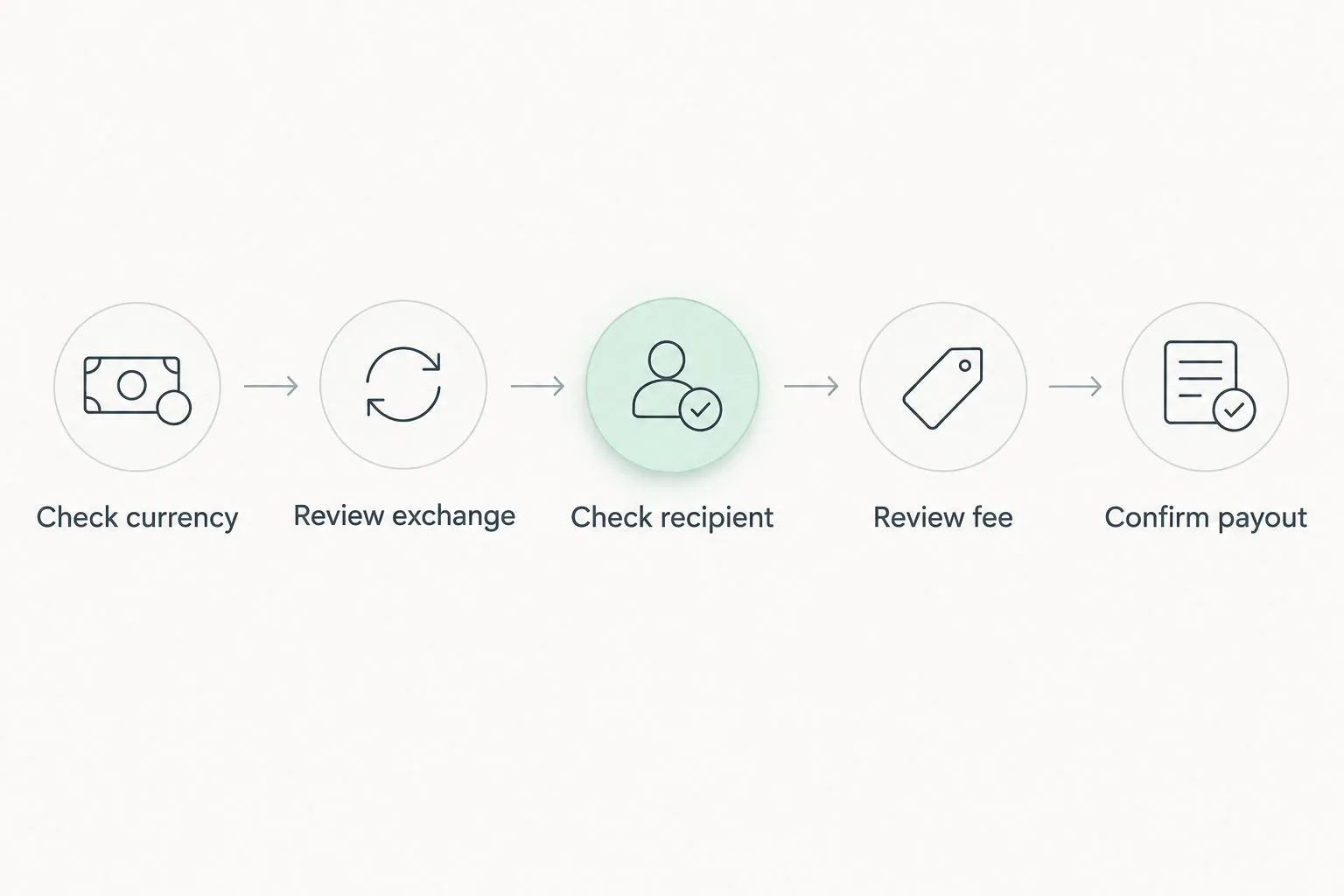
Review any exchange separately before confirming the outgoing SEPA payment.
Every payout requires 2FA. New recipients and team access grants also require 2FA, so include authorization in your payment process rather than treating it as an exception.
For teams, assign access deliberately. The available roles are owner, admin, operator and view-only. Keep the person checking invoice details involved before the payment is confirmed, especially when several companies share one sign-in.
Open an account
Get your own USD and EUR account details after verification. Review fees before confirming payments.
Does paying the SEPA fee change the delivery time?
SEPA payouts usually take 1–2 business days under the supplied 2026 service information. The published fee schedule doesn't establish a faster delivery tier, so don't interpret the fee as a promise of a particular arrival time.
Incoming SEPA payments usually arrive within a business day. That's a receiving estimate, not the outgoing payout estimate. Keep the direction of the payment clear when answering a client or supplier's timing question.
Live payout status progresses through Processing, On its way and Completed. Use that status to follow the payment instead of assuming that confirmation means completion. Check the separate guide to how long a SEPA transfer takes to arrive when planning around an invoice deadline.
How much EUR can you send in a SEPA payout?
€10,000 per payout is the individual limit in the supplied schedule, with a €50,000 monthly limit. Businesses have a €100,000 per-payout limit and no monthly limit under that schedule.
Limits and fees answer different questions. A payment fitting within a limit still carries the applicable transaction fee. A payment exceeding a limit doesn't become eligible simply because you're prepared to pay the charge.
Check the correct profile before arranging a large payment. Individual and business limits differ, and business verification uses a business review rather than only an individual ID check. Neither approval nor a verification deadline is promised.
FAQ
What's the cost to send a SEPA payment in 2026?
Moneyspace charges 0.5% for outgoing SEPA payments, with a €2 minimum, under the client-supplied schedule dated October 26, 2026. A required USD/EUR exchange carries a separate fee.
Is the €2 SEPA minimum added to the percentage fee?
No. The €2 minimum is the fee floor, not an additional charge on top of 0.5%. Review the fee shown before confirmation.
Do I pay an exchange fee if I already have EUR?
You don't need a USD/EUR exchange to send EUR you already hold. The outgoing SEPA fee still applies.
Does receiving a SEPA payment cost the same as sending one?
Incoming and outgoing SEPA payments both have a published 0.5% fee, but outgoing SEPA has a €2 minimum. Treat receiving and sending as separate transactions.
How long does an outgoing SEPA payment take?
Outgoing SEPA payments usually take 1–2 business days. Follow the live payout status rather than treating the estimate as a fixed arrival deadline.
Can I send a SEPA payment from anywhere?
Don't assume universal eligibility or destination coverage. Confirm account eligibility and support for the intended recipient before arranging the payment.
Is Moneyspace a bank?
Moneyspace is not a bank. Account details are provided through a licensed partner after verification.
One last thing
A EUR invoice doesn't automatically require a currency exchange. Before converting USD, check whether you already hold EUR that can fund the payment. That simple review keeps an unnecessary exchange step out of the workflow.
For your 2026 payment checklist, record three things separately: the invoice currency, any required exchange and the outgoing fee shown before confirmation. Then track the payout through completion. A percentage alone isn't a complete payment record.