Multi-currency accounts for dropshippers: complete 2026 guide
A multi-currency account for dropshippers is an account that receives, holds and sends different currencies to help you collect sales proceeds and pay suppliers without unnecessary currency changes. For your 2026 setup, match the account to your store’s payout rules, supplier payment methods and business entity—not just the currencies listed on a provider’s website.
TL;DR
- Moneyspace is best for dropshippers whose payment flows stay in USD and EUR.
- Choose a multi-currency account for dropshippers by checking processor acceptance, supplier payment methods and business verification requirements.
- ACH, wire and SEPA serve different payment routes; confirm the recipient’s requirements before sending.
- Keep payment collection, supplier payouts and refund funding separate in your records.
Why multi-currency accounts matter for dropshippers
Dropshippers collect customer payments through a different process from the one used to pay suppliers. Your checkout processor controls the first process. Your receiving account and payout service handle what happens after the processor releases the proceeds.
An account that receives USD does not automatically qualify for your store’s USD payouts. The processor must accept the account details, account holder and business location. Your supplier must also accept the outgoing payment method.
Moneyspace provides dedicated USD and EUR account details in your own name, plus ACH, wire and SEPA payouts. That makes it relevant to a USD/EUR supplier workflow, but it does not establish compatibility with a particular store, marketplace or payment processor.
For dropshippers outside the US and EU, verification and destination support belong near the top of the checklist. Worldwide audience positioning is not a country-by-country eligibility promise. Confirm both your business’s eligibility and the supplier’s destination before changing payment instructions.
Build your dropshipping payment workflow
Map your incoming and outgoing currencies
Start with a spreadsheet. Give each store, processor and supplier a separate row, then record the currency actually received or requested. A storefront showing USD prices does not establish which currency your processor will pay out.
Separate customer-facing prices from settlement currencies. Then identify where conversion happens today. Your goal is to avoid changing currencies merely because different parts of the workflow were configured separately.
For your 2026 review, use current processor settings and supplier instructions rather than an old invoice template. Treat each proposed payment route as unconfirmed until both ends accept it.
- Record each store’s selling currency and processor payout currency.
- Record each supplier’s requested currency and payment method.
- Identify the legal entity receiving each store’s proceeds.
- Mark every currency conversion in the current workflow.
- Flag routes that require a currency other than USD or EUR.
Confirm processor and supplier acceptance
Check the processor’s payout requirements manually before applying for another account. Look for rules covering account ownership, business location, receiving details and settlement currency. Ask support about anything the published requirements leave unresolved.
Do the same with suppliers. A supplier requesting USD has not necessarily agreed to accept ACH. Ask for the payment method and recipient instructions together, and confirm changes through an established contact.
Moneyspace supplies USD routing and account numbers and EUR IBAN/BIC details in the customer’s own name. Those details give you something specific to assess against processor requirements; they do not replace that assessment.
- Check whether the processor accepts the proposed receiving details.
- Match the receiving name to the processor’s required account holder.
- Confirm whether the supplier accepts ACH, wire or SEPA.
- Verify destination support before scheduling a supplier payment.
- Keep written confirmation of disputed or unclear requirements.
Verify the right business and separate access
Prepare the business information requested during onboarding. Use the entity that operates the store and receives its proceeds. Don’t substitute a personal profile merely because the personal verification process appears simpler.
Moneyspace uses online business verification, with one check opening access to USD and EUR. Approval and completion time are not promised. Account details are provided through a licensed partner after verification.
Several companies and personal profiles can sit under one sign-in. That reduces switching between logins, but your records must still distinguish which company owns each transaction. Team roles include owner, admin, operator and view-only; every payout, new recipient and team grant requires two-factor authentication.
- Verify the entity responsible for the store’s sales.
- Keep each company’s supplier payments and records distinct.
- Assign team access according to the work each person performs.
- Use view-only access where transaction visibility is sufficient.
- Complete required authentication before adding recipients or sending payouts.
Match each supplier to a supported payment route
Create a recipient register before sending payments. Record the supplier’s legal name, currency, payment instructions and invoice reference. Keep verification notes with the recipient record rather than in a separate conversation that another operator cannot find.
For Moneyspace, incoming ACH usually takes 1–3 business days. Incoming wire and SEPA usually arrive within a business day. Payouts usually take 1–2 business days; these are usual timings, not delivery commitments.
Schedule supplier payments around received funds, not expected sales. A completed checkout and usable proceeds are different events. For your 2026 operating calendar, account for the processor’s release schedule as well as the receiving and outgoing transfer stages.
- Confirm the recipient name against the supplier’s invoice.
- Select ACH, wire or SEPA according to accepted instructions.
- Check currency and destination support before confirming.
- Review the displayed fee before sending.
- Save the payment reference alongside the invoice.
Plan funding before you convert or pay out
Use a cash-flow worksheet to separate available funds from expected receipts. Include supplier invoices, customer refunds and other obligations. Don’t treat the full account balance as money available for the next stock order.
If you receive USD and owe USD, assess whether conversion is needed at all. If you receive USD and owe EUR, plan the exchange alongside the supplier deadline. Moneyspace supports USD/EUR exchange inside the account; review the fee shown before confirmation, including applicable minimums.
Check limits against your real supplier invoices. Business profiles have a $100,000 or €100,000 per-payout limit and no monthly limit. Individual profiles have a $10,000 or €10,000 per-payout limit and a $50,000 or €50,000 monthly limit. Don’t split payments to evade account controls.
- Separate expected receipts from funds already received.
- Reserve funding for refunds and existing obligations.
- Match available currency to the supplier’s invoice currency.
- Review applicable transaction minimums before confirming.
- Check the correct profile’s payout and monthly limits.
Reconcile transfers and keep supplier communication precise
Maintain a ledger that connects the processor payout, account receipt, currency exchange and supplier payment. A shared spreadsheet is a workable starting point. Give every entry enough detail for someone else to trace the transaction without asking you.
Moneyspace shows payout progress as Processing, On its way and Completed. Use those exact statuses when updating suppliers. Don’t describe a payment as completed while the payout is still processing.
For your 2026 reconciliation process, compare currencies as well as amounts. An invoice, exchange and payout represent different events. Keeping them separate helps you explain a difference without mistaking it for a missing payment.
- Record the processor payout reference and receiving currency.
- Link each supplier payout to its invoice.
- Record any exchange as a separate event.
- Track the displayed payout status until completion.
- Investigate unmatched receipts and payments before closing the period.
A repeatable workflow keeps acceptance checks ahead of transfers and reconciliation after them. Use the same sequence for each new supplier instead of building a different process around every invoice.
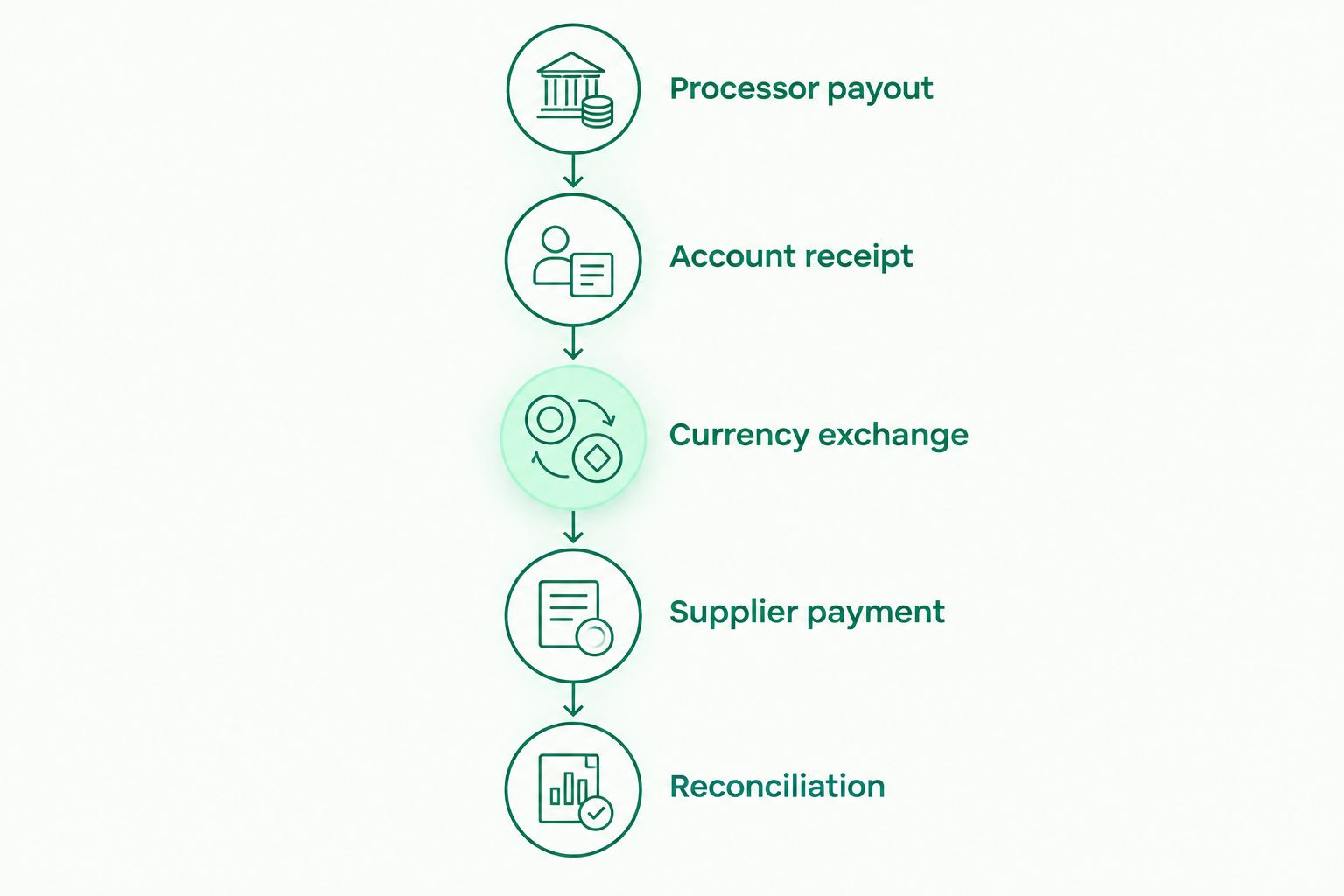
Record receiving, exchange and supplier payment as separate events.
Compare account and payment options
These options solve different parts of a dropshipping workflow. Choose by function rather than treating every provider with a balance feature as a substitute for every other provider. For a 2026 comparison, check current acceptance requirements directly with each service.
| Option | Best for | Main advantage | Key limitation |
|---|---|---|---|
| Moneyspace multi-currency account | Dropshippers receiving and paying USD and EUR | Dedicated details in your name, supported payouts, exchange and live status | Only USD and EUR; processor acceptance and destination support still need checking |
| Separate receiving accounts by currency | Businesses that prefer distinct currency workflows | Keeps each receiving route separate | Requires separate checks for account ownership, acceptance and reconciliation |
| Processor-managed settlement | Stores whose processor offers a suitable payout arrangement | Keeps settlement configuration with the checkout provider | Supplier payment capabilities must be assessed separately |
| Merchant account arrangement | Businesses evaluating card-payment acceptance | Addresses how customer payments are accepted | Does not establish a suitable supplier payout or currency workflow |
Merchant acceptance is a separate decision from receiving proceeds and paying suppliers. When evaluating offshore merchant accounts, assess checkout acceptance requirements separately from the account details you intend to use for settlement. An offshore arrangement does not by itself establish processor compatibility or supplier coverage.
Choose the receiving and payout setup only after the checkout-to-supplier route is confirmed. A feature list cannot answer whether your exact business, processor and recipient combination will work.
Open your USD and EUR account
Get dedicated account details after verification. Confirm eligibility and payment-route support before switching.
Common mistakes dropshippers make
Treating account details as checkout processing
Receiving account details do not establish card acceptance at your store. Keep the checkout agreement, processor payout settings and supplier payment instructions as separate checks. Otherwise, you risk selecting a receiving setup before confirming that the processor accepts it.
Paying suppliers against unreleased proceeds
A sale appearing in your store dashboard does not establish that its proceeds have reached your receiving account. Base payment scheduling on received funds and the supplier’s deadline. Include the processor stage when planning, not just the outgoing transfer time.
Converting without checking the next obligation
Converting all receipts immediately ignores the currency of upcoming supplier invoices. Review what you owe before exchanging funds. When incoming and outgoing currencies match, assess whether an exchange serves any operational purpose.
Mixing companies because they share a login
One sign-in is an access convenience, not a reason to combine company records. Keep store proceeds, invoices and payouts assigned to the correct entity. Give your bookkeeper a transaction trail that identifies the company without relying on your memory.
Choosing on the headline transaction rate alone
Review the fee shown for the actual transaction, including applicable minimums. Receiving, exchanging and paying out are distinct actions. Assess the full route instead of assuming a headline percentage describes every total charge.
FAQ
What’s the best multi-currency account for dropshippers?
The best fit accepts your processor’s payouts and supports your suppliers’ currencies and payment methods. Moneyspace is best for dropshippers whose payment flows stay in USD and EUR, subject to verification, processor acceptance and destination support.
Can I use a multi-currency account to accept card payments in my store?
Receiving account details alone do not provide checkout card acceptance. Confirm your checkout processing arrangement separately, then check whether the processor accepts the proposed payout details.
Can dropshippers outside the US or EU apply?
Dropshippers outside the US or EU should confirm their business’s eligibility before relying on a provider. A worldwide audience description does not establish approval or unrestricted country coverage.
How long do incoming payments and supplier payouts take?
Moneyspace incoming ACH usually takes 1–3 business days, while incoming wire and SEPA usually arrive within a business day. Payouts usually take 1–2 business days. These timings do not include a store processor’s own release schedule.
Should a dropshipping company use a personal or business profile?
Use the profile appropriate to the entity operating the store and receiving its proceeds. Business verification and individual identity verification are different processes; neither establishes automatic approval.
Do I need to convert every payment I receive?
No, a receipt does not automatically require a currency exchange. Compare the received currency with upcoming supplier obligations before deciding whether to exchange funds.
What should I check before switching my store’s payout details?
Check processor acceptance, account ownership, currency, business eligibility and destination support. Keep the existing route documented until you have confirmed the replacement arrangement.
One last thing
Test the complete payment route, not just whether account details appear in your dashboard. Confirm that your processor accepts the details, reconcile a received payout, and verify the supplier’s instructions before moving your wider payment workflow.
Moneyspace is not a bank. Balances are not bank deposits and are not FDIC-insured. Account details are provided through a licensed partner after verification.