Multi-currency accounts for nonprofits and NGOs: complete 2026 guide

Nonprofit multi-currency account management is receiving, holding, exchanging, and paying money in different currencies to support an organization’s work. A multi-currency account for nonprofits should fit your funding currencies, payment destinations, and reporting requirements—not just your next international transfer.
TL;DR
- Choose a multi-currency account for nonprofits by legal eligibility, donor payment methods, team controls, and reporting needs.
- Moneyspace supports USD and EUR payments; confirm nonprofit eligibility before treating it as an option.
- Keep restricted-fund records separate from currency balances; an account balance doesn’t identify what money can fund.
- Match ACH, wire, and SEPA to the payer, recipient, currency, and supported destination.
Why multi-currency accounts matter for nonprofits and NGOs
Your organization can receive a grant in one currency and pay a supplier in another. That creates separate decisions: where to receive funds, when to exchange them, and how to document the final payment.
For your 2026 account review, start with actual donor instructions and supplier requirements. Don’t assume that international account details solve every payment route. The guide to international wire transfer services provides related context when wire payments are part of your workflow.
Nonprofit finance adds another layer: a payment must make sense against the grant agreement, internal authority, and accounting records. A successful transfer doesn’t prove that the expenditure was permitted.
Choose the account around your organization’s obligations, not around the longest currency list. A narrower account can fit a defined payment flow, while an account with more currencies still needs suitable controls and records.
How to choose and operate your account
1. Map your funding and spending currencies
Start with a spreadsheet. List each funding source, the currency promised, the expected receiving method, and the organization named in the agreement. Then list your suppliers, contractors, and other recipients by payment currency and destination.
Keep the original commitment separate from the amount received. A grant expressed in USD and a supplier invoice expressed in EUR are different obligations, even if you eventually handle both through the same account.
Use this map to identify currency matches before exchanging funds. Receiving and spending in the same currency avoids an unnecessary conversion step; it doesn’t eliminate payment charges or accounting work.
- Record the currency specified in each grant agreement.
- Identify whether each payer can use ACH, wire, or SEPA.
- Record each recipient’s requested currency and destination.
- Separate recurring payments from one-time project expenses.
- Flag any required currency outside USD and EUR.
2. Confirm eligibility before sharing account details
Check eligibility manually with each provider before moving a funding relationship. Ask about your exact legal structure, registration country, operating countries, and intended recipients. An account marketed to businesses isn’t proof that it accepts your nonprofit entity.
Prepare organization records and identify the people authorized to act for it. Request the provider’s actual document checklist rather than assuming a standard commercial-business checklist applies unchanged.
Make eligibility a documented decision in your 2026 selection process. Don’t print receiving details on grant paperwork until the account is approved, active, and appropriate for that payment.
- State your nonprofit or NGO legal structure accurately.
- Disclose your registration and operating jurisdictions.
- Describe the source and purpose of incoming funds.
- Confirm supported recipient countries and payment routes.
- Obtain the required verification checklist before applying.
3. Match account capabilities to specific payment routes
Compare providers against the spreadsheet rather than a feature headline. For each route, check the account holder’s name, receiving details, currency, transfer method, and required payment reference. Keep a written record of any unresolved question.
Moneyspace provides dedicated USD and EUR account details in the customer’s own name, through a licensed partner after verification. It supports receiving by ACH, wire, and SEPA, USD/EUR exchange, and payouts through supported ACH, wire, and SEPA routes. Nonprofit eligibility still needs confirmation.
Moneyspace is best suited to organizations whose payment needs center on USD and EUR, subject to confirmation of entity eligibility and supported destinations. Its stated currency scope does not cover a requirement to hold other currencies.
- Match USD receiving needs to the available ACH or wire instructions.
- Match EUR receiving needs to the available SEPA instructions.
- Confirm that the account name fits the funding agreement.
- Check the proposed payout destination before requesting funding.
- Keep a separate solution for unsupported currency requirements.
4. Define team access and payment authorization
Write the authorization process before inviting colleagues. Identify who prepares a payment, who checks the supporting documents, who authorizes spending, and who reconciles the result. A spreadsheet or written procedure can establish these responsibilities without additional software.
Moneyspace offers owner, admin, operator, and view-only roles, with several companies and personal profiles under one sign-in. Every payout, new recipient, and team grant requires two-factor authentication. These controls support account security; they do not establish that a grant expense has been approved.
Check the permissions associated with each role before assigning it. Don’t assume that a role name includes dual approval, spending thresholds, or a nonprofit-specific authorization workflow.
- Assign access according to the work each person performs.
- Keep spending approval separate from supporting-document preparation.
- Verify new recipient details through an established contact channel.
- Remove access when a staff member’s responsibilities end.
- Document approvals outside the account when necessary.
5. Plan payment timing and check applicable limits
Build a payment calendar from contractual due dates. Include time for your internal review, recipient checks, provider processing, and the receiving institution’s handling. Treat a provider’s usual timing as a planning input, not a delivery commitment.
For Moneyspace, incoming ACH usually takes 1–3 business days, while incoming wire and SEPA usually arrive within a business day. Payouts usually take 1–2 business days. Business accounts have a stated limit of $100,000 or €100,000 per payout and no monthly limit; confirm the applicable account classification before relying on those limits.
For a 2026 grant disbursement schedule, check the route and amount before making a payment commitment. A large award arriving successfully doesn’t establish that every onward payment fits the account’s limits.
- Record the recipient’s contractual due date.
- Allow time for internal authorization before submission.
- Check the applicable per-payout limit.
- Review the fee shown before confirming the payment.
- Track the transfer until completion and retain its record.
6. Reconcile each payment to its funding purpose
Start with a manual reconciliation sheet that connects the funding agreement, incoming transfer, expenditure approval, supplier invoice, and outgoing payment. Keep currency amounts separate from your accounting treatment of those amounts.
Use live payout status to track execution, not to replace your ledger. The status sequence Processing, On its way, and Completed describes transfer progress. It doesn’t identify which restricted fund paid an invoice or whether an expense belongs in a particular reporting period.
In your 2026 reporting process, retain evidence that another person can follow without access to the original conversation. Confirm any accounting export requirements directly; don’t assume that payment tracking includes fund accounting or accounting-system integration.
- Link incoming funds to the relevant funding agreement.
- Record the original currency and amount of each transaction.
- Attach the invoice and internal approval to the payment record.
- Record conversion charges and payment charges separately.
- Reconcile completed payments against your accounting records.
The operating sequence is simple: confirm the entity, establish payment instructions, authorize expenditure, track execution, and reconcile the result. Keep each decision visible rather than treating the transfer confirmation as the entire record.
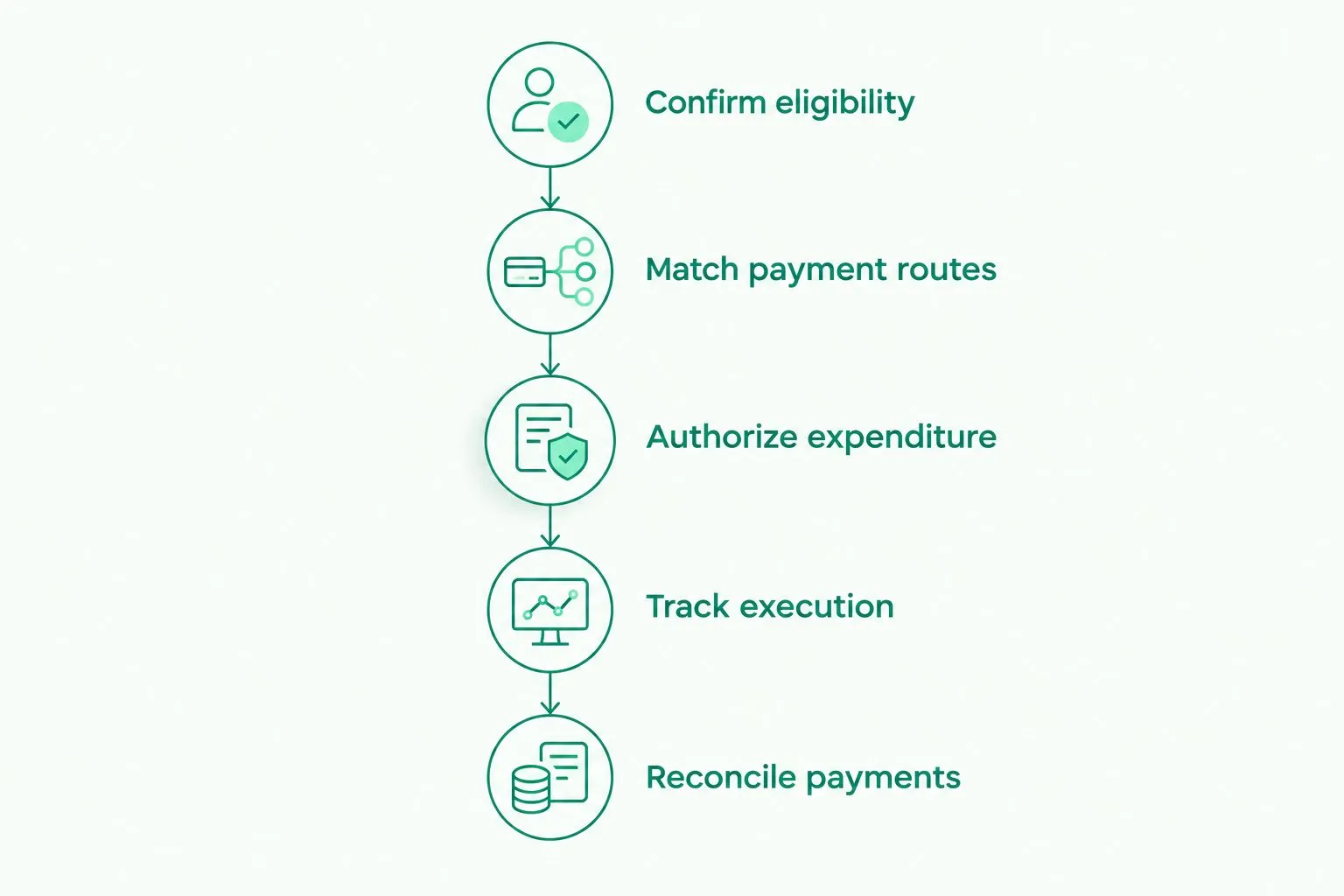
Payment execution is one stage of the process, not the whole financial record.
Compare account options by the job they need to do
Use this table to build a shortlist, not to infer approval. The best option depends on the entity, currencies, recipients, and records you need. Ask each provider to confirm its current terms for your organization.
| Option | Best for | Main advantage | Key limitation |
|---|---|---|---|
| Existing domestic account | Organizations whose funding and spending mainly use their home currency | Keeps an established receiving relationship | Foreign-currency capabilities and international payment routes need checking |
| USD/EUR payment account | Organizations receiving and paying mainly in USD and EUR | Can align receiving details and outgoing payment methods with those currencies | Does not address a requirement to hold other currencies |
| Broader multi-currency provider | Organizations with documented needs beyond USD and EUR | Offers a category of options to investigate for additional currencies | Currency support alone does not establish nonprofit eligibility or destination coverage |
| Donation platform | Organizations that need a donor-facing collection process | Addresses the donation collection stage | Does not automatically replace supplier payments, account controls, or fund accounting |
| More than one provider | Organizations with payment needs that no single provider meets | Lets each provider serve a defined route | Adds reconciliation work and access-management responsibilities |
Compare collection, payment execution, and accounting separately. A donation platform’s collection features don’t prove that it can handle your supplier payments. Likewise, dedicated receiving details don’t prove that an account includes donor receipts or grant reporting.
Keep your 2026 shortlist focused. Reject a provider when a required capability is absent; don’t compensate for that gap with unrelated features.
Common mistakes nonprofits and NGOs make
Assuming business eligibility includes nonprofit eligibility
A business application path doesn’t settle whether your legal structure is accepted. Confirm the entity type, countries involved, and intended activity before changing donor instructions. Keep the provider’s response with your selection records.
Treating currency balances as restricted-fund accounting
A USD balance can contain money assigned to different purposes. Track those purposes in your accounting records rather than assuming the currency balance separates them. Confirm the reporting format required by each funding agreement.
Confusing secure access with spending approval
Two-factor authentication checks access to an action. It doesn’t establish that a project manager approved an invoice or that the expenditure fits a grant. Keep authorization evidence alongside the payment record, even when account access is tightly controlled.
Promising recipients a fixed arrival date
Usual processing times are not fixed arrival commitments. Schedule payments around the stated route timing and your internal checks. Don’t describe a payment as completed while its status still shows processing or onward movement.
Replacing every payment route at once
An account that fits USD grant receipts might not fit every local supplier payment. Validate each route before changing it. Retain necessary existing arrangements until your organization has confirmed that the replacement meets the actual requirement.
FAQ
What’s the best multi-currency account for nonprofits?
The best multi-currency account for nonprofits is one that accepts your legal entity and supports your actual funding and payment routes. Compare currencies, recipient destinations, team permissions, payment records, and applicable limits before choosing.
Can a nonprofit or NGO open a Moneyspace account?
Nonprofit and NGO eligibility must be confirmed directly with Moneyspace. Its stated offering covers individuals and businesses, but that does not establish approval for every nonprofit legal structure or country.
Do nonprofits need separate accounts for USD and EUR?
Not necessarily; an eligible provider can offer USD and EUR details through one account relationship. Confirm how each currency is received, held, exchanged, and paid out before sending instructions to donors.
Can a multi-currency account replace nonprofit accounting software?
A multi-currency account does not by itself replace nonprofit accounting software. You still need records connecting funding restrictions, approved expenditure, conversion activity, and completed payments.
Should a US donor send ACH or wire?
Use the method supported by both the donor and your receiving instructions. Check the currency, account name, required reference, applicable charges, and usual timing before requesting the transfer.
How long should an NGO allow for an international payout?
Use the provider’s route-specific timing and allow for your internal approval process. Moneyspace states that payouts usually take 1–2 business days; that is not a fixed arrival commitment.
Is a dedicated payment account the same as a donation platform?
No; dedicated account details receive payments, while a donation platform addresses donor-facing collection. Confirm separately whether you need donation forms, donor records, receipts, supplier payments, or accounting tools.
One last thing
Before sending new payment instructions, ask someone who didn’t choose the account to trace a sample grant from agreement to final expenditure record. Have them identify the legal recipient, currency, permitted purpose, authorization, and completed payment evidence.
If they can see the transfer but can’t explain the expenditure, the missing piece is your recordkeeping—not another currency balance. Make the audit trail understandable before increasing payment volume.
Moneyspace is not a bank. Its account details are provided through a licensed partner after verification. Confirm nonprofit eligibility and supported destinations before applying.