SEPA payouts for online coaching businesses: complete 2026 guide

Online coaching business SEPA payouts are EUR transfers to eligible recipients through the Single Euro Payments Area, with the aim of paying coaches, contractors, and suppliers. Your workflow needs to separate outgoing service payments from client collections, match the recipient’s payment details, and leave a clear record for each invoice.
TL;DR
- A SEPA payout for online coaching business payments fits EUR invoices from recipients whose providers accept SEPA transfers.
- Moneyspace supports SEPA payouts alongside dedicated USD and EUR account details; confirm eligibility before relying on access.
- Match the invoice currency, recipient name, and IBAN before approving a coaching contractor’s payout.
- Plan around usual processing times, not the date you submit a payment.
Why SEPA payouts matter for online coaching businesses
Use SEPA when you owe EUR and the recipient can receive a SEPA transfer. A contractor’s location alone doesn’t answer that question. Confirm the recipient’s payment instructions before choosing the route.
Coaching businesses need to distinguish several payment purposes. Collecting a client’s program payment is different from paying a session facilitator, refunding a client, or settling a software invoice. This guide focuses on outgoing payments, not card checkout or subscription billing.
For your 2026 payment setup, Moneyspace provides dedicated USD and EUR account details in your own name, plus ACH, wire, and SEPA payouts. Access depends on verification and supported destinations. Don’t assume that serving international clients establishes eligibility for every recipient.
A practical payout process connects the service delivered, the approved invoice, and the completed transfer. That connection matters when a contractor asks about payment or your bookkeeper needs to identify an expense. A transfer status alone doesn’t explain which coaching engagement the payment covers.
How to set up SEPA payouts for your coaching business
1. Map the payments you actually need to make
Start with a spreadsheet and your existing invoices. List who you pay, what currency each agreement requires, and which legal entity owes the payment. You don’t need new software to build this first record.
Separate contractor compensation from employee payroll, supplier invoices, and client refunds. A transfer service moves money; it doesn’t establish worker classification, calculate payroll obligations, or decide whether a refund is due.
For each coaching engagement, record the agreed payment trigger. That might be an approved session invoice or a completed project milestone. Use the actual contract rather than inventing a payment schedule around your provider’s interface.
- Record the recipient’s legal name and invoice currency.
- Identify the company or personal profile responsible for payment.
- Separate contractor invoices, supplier bills, and refunds.
- Record the due date and approval owner.
- Keep the contract or invoice beside the payment record.
2. Confirm the recipient’s EUR payment instructions
Ask each recipient for current payment instructions through your normal business channel. Confirm the account holder’s name, IBAN, and whether the recipient’s provider accepts SEPA transfers. An IBAN identifies an account; it doesn’t establish your sender’s access or destination support.
Keep currency selection separate from geography. A contractor working with European clients might still invoice you in USD. Don’t change an agreed invoice currency simply because SEPA appears convenient.
For your 2026 provider shortlist, compare SEPA payment platforms for businesses against your actual recipients. Treat an unexpected request to replace payment details as a separate verification task, not a routine invoice edit.
- Request the recipient’s legal name and IBAN.
- Confirm that the receiving provider accepts SEPA transfers.
- Match the payout currency to the approved invoice.
- Verify changed instructions through an established contact channel.
- Check destination support with the sending provider.
3. Choose access that matches your business structure
First, check whether your current provider supports the required EUR payout route and your business profile. Keep a manual checklist of verification requirements, recipient coverage, access permissions, and transfer records. Compare those requirements before moving your payment workflow.
Moneyspace is best for coaching businesses that need their own USD and EUR account details and SEPA payouts. Businesses complete KYB verification online, and one verification opens access to both currencies. Account details are provided through a licensed partner after verification.
The service supports several companies and personal profiles under one sign-in. That helps organize access, but you still need to select the correct paying entity. Don’t treat shared access as permission to mix company obligations.
- Confirm eligibility for your location and business profile.
- Prepare the documents requested during business verification.
- Check recipient coverage before committing to a payment date.
- Keep each company’s invoices and payment records separate.
- Allow for verification without assuming an approval deadline.
4. Approve the invoice before entering the payout
Use a written approval record before you create the transfer. Confirm that the invoiced coaching sessions or services match the agreement. Resolve disagreements about hours, deliverables, or currency before sending money.
Then enter the recipient and amount, and inspect the fee shown before confirmation. If your available funds and invoice use different currencies, review the exchange and payout separately. Don’t assume that the amount entered, the amount deducted, and the recipient’s expected invoice amount are interchangeable.
Keep the invoice reference in your own payment register. Don’t assume that a provider supports a particular reference field, accounting connection, or automated invoice match unless you’ve confirmed that feature.
- Match the invoice to the approved work.
- Check the paying entity and available currency.
- Recheck the recipient name and payment details.
- Review the displayed fee before confirming.
- Record the transfer against the original invoice.
5. Schedule around limits and usual timing
Build your 2026 payment calendar backward from the contractual due date. Submitting a payout on that date leaves no room for the usual processing period. Tell the contractor when you submitted the payment without presenting submission as receipt.
Moneyspace payouts usually take 1–2 business days. Incoming ACH usually takes 1–3 business days, while incoming wire and SEPA transfers usually arrive within a business day. Incoming funding and an outgoing payout are separate stages; don’t treat expected client revenue as funds already available to send.
Business limits are $100,000 or €100,000 per payout, with no monthly limit. Individuals have different limits: $10,000 or €10,000 per payout and $50,000 or €50,000 per month. Choose the profile that accurately reflects your activity, not the limit you prefer.
- Record the invoice due date in your payment calendar.
- Check available funds before scheduling the payout.
- Allow for the usual outgoing processing period.
- Check the applicable per-payout limit.
- Communicate submission and completion as separate events.
6. Assign team access deliberately
Write down who prepares payments, who reviews invoices, and who needs visibility. A small coaching business can manage that responsibility list manually. The important distinction is between a business procedure and a permission enforced by software.
Available team roles include owner, admin, operator, and view-only. Every payout, new recipient, and team grant requires 2FA. These controls don’t establish a separate dual-approval workflow; confirm the exact permissions before assigning responsibilities.
For your 2026 access review, include assistants, finance contractors, and former collaborators. Keep access tied to current responsibilities. A person who needs to reconcile an invoice doesn’t automatically need authority to create recipients or send payments.
- Assign access according to each person’s responsibilities.
- Confirm each role’s permissions before granting it.
- Require staff to follow the 2FA process.
- Review access when a contractor’s engagement ends.
- Document invoice approval separately from transfer execution.
7. Track each payout through completion
Maintain a payment register with the invoice reference, recipient, amount, submission date, and current status. Check unresolved entries directly rather than asking contractors to infer progress from a payment screenshot.
The live payout stages are Processing, On its way, and Completed. Use those exact labels when discussing progress. Don’t describe Processing as completed payment, and don’t treat a status update as evidence that every invoice detail was correct.
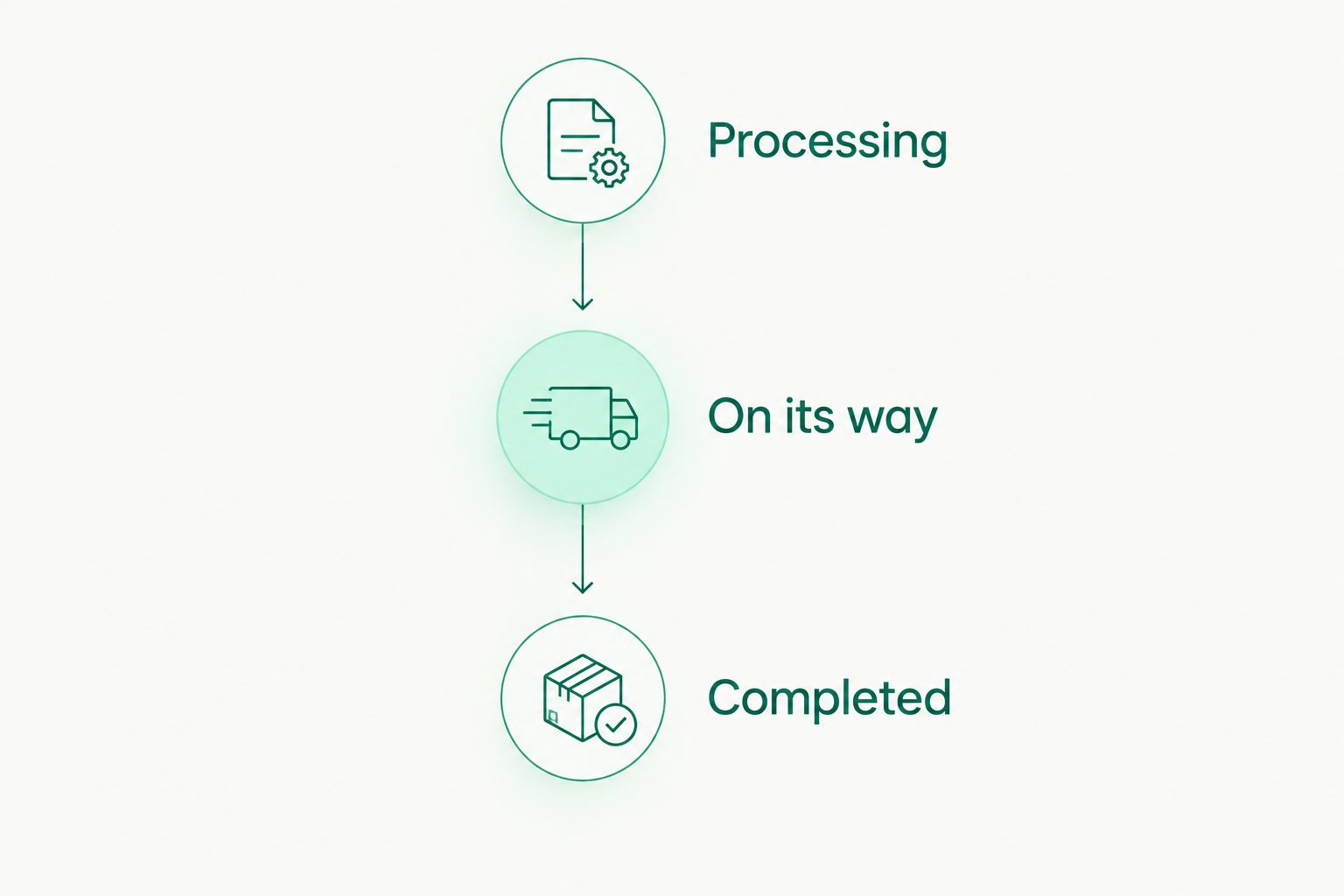
Use the displayed payout stage when communicating progress to a contractor.
If a recipient reports a missing payment, compare the transfer record with the original instructions. Don’t immediately send a replacement. Establish what happened to the first transfer before creating another obligation in your records.
- Copy the current payout status into your register.
- Match completed transfers to their invoices.
- Investigate payments that need follow-up.
- Check the original instructions before considering a replacement.
- Retain the transfer record with the accounting documents.
Compare payout options for online coaching businesses
Choose the payment route from the invoice currency and recipient’s instructions. Choose the provider from eligibility, controls, and the records you need. These are separate decisions: a provider can support more than one payment route.
The comparison below separates those choices. It doesn’t assume that your existing provider supports every destination or that a transfer method replaces payroll administration.
| Option | Best for | Practical advantage | Key limitation |
|---|---|---|---|
| SEPA through your current provider | EUR contractor invoices with eligible receiving details | Keeps the workflow with an existing provider if supported | Confirm business access, destination support, controls, and timing |
| Moneyspace SEPA payouts | Coaching businesses managing EUR payouts alongside USD activity | Own USD and EUR account details, team roles, and live payout status | Limited to USD and EUR; verification and destination support still apply |
| ACH | USD invoices with recipients who accept ACH | Matches a supported USD payment route to the invoice | Not a substitute for a EUR-denominated SEPA payment |
| Wire | USD payments where the recipient requests supported wire instructions | Provides another supported USD route | Requires the correct wire instructions and review of the displayed fee |
For a EUR coaching invoice, start by checking SEPA compatibility rather than converting the payment merely to use ACH. For a USD invoice, assess the recipient’s ACH or wire instructions instead. Don’t create an exchange step without a contractual or operational reason.
Open an account
Get your own USD and EUR account details after verification. Check support for your intended recipients.
Common mistakes online coaching businesses make
Treating client collection as contractor payout
A checkout process answers how clients pay you. A payout process answers how you settle obligations to coaches and suppliers. Assess them separately, and don’t assume that receiving EUR provides subscription billing, refund automation, or card acceptance.
Changing invoice currency without agreement
A EUR payout doesn’t resolve a USD invoice unless the parties agree how to settle it. Confirm the payment currency before preparing the transfer. Keep any agreed change with the invoice so your bookkeeper can understand the settlement.
Using expected client revenue as available funding
A client’s payment notification isn’t the same as available funds. Check the actual balance before paying your coaching team. Keep incoming processing time separate from outgoing processing time when setting payment dates.
Assuming transfer permissions equal invoice approval
A person’s ability to submit a payment doesn’t prove that the work was approved. Record the business approval separately. Don’t describe 2FA as a substitute for checking the invoice or verifying changed recipient instructions.
Mixing several companies in one payment register
A shared sign-in doesn’t combine separate companies’ obligations. Identify the paying entity for each invoice and retain separate records. Check that the selected profile matches the coaching business that contracted for the work.
FAQ
What is a SEPA payout for an online coaching business?
A SEPA payout is an outgoing EUR transfer to an eligible recipient through the Single Euro Payments Area. A coaching business can use it to settle approved contractor or supplier invoices when the recipient accepts SEPA transfers.
Is SEPA better than ACH for paying coaching contractors?
SEPA fits eligible EUR payments, while ACH fits supported USD payments. Choose the route that matches the invoice currency and the recipient’s instructions rather than treating either route as universally better.
Can a coaching business outside the EU use Moneyspace?
Moneyspace serves international individuals and businesses, including customers outside the US and EU, but access depends on verification and eligibility. Confirm support for your business profile and intended destinations before relying on the service.
How long do coaching contractor payouts take?
Moneyspace payouts usually take 1–2 business days. Plan funding and submission separately, and don’t present the usual processing period as a fixed completion deadline.
Can I use SEPA payouts to collect recurring coaching subscriptions?
Outgoing SEPA payouts don’t establish recurring subscription collection. Treat client billing and contractor payouts as separate requirements, and confirm collection features before changing your checkout process.
Can my assistant help manage coaching payouts?
Team access includes owner, admin, operator, and view-only roles. Confirm each role’s permissions before assigning responsibilities; every payout, new recipient, and team grant requires 2FA.
What should I do if a contractor says a payment is missing?
Check the payout status and compare the transfer record with the approved recipient instructions before sending a replacement. Keep the invoice, submission record, and follow-up together so you can resolve the original payment first.
One last thing
Before changing your 2026 payout process, trace one real contractor invoice from approval to completed transfer. Check the paying entity, currency, recipient instructions, displayed fee, and final record. A process that works for that invoice gives you a concrete checklist for the next one.
Moneyspace is not a bank. Account details are provided through a licensed partner after verification. Treat the service as a payment workflow, not a replacement for your accounting, employment, or tax obligations.